
Walk into any modern factory, water treatment plant, or power substation and you will see them: glowing touchscreen panels mounted beside machines, showing colorful graphics of tanks, motors, temperatures, and pressures. Operators tap buttons on these screens to start conveyors, adjust setpoints, and acknowledge alarms. These panels are HMIs — Human Machine Interfaces — and they are the face of industrial automation.
An HMI is the window through which humans see what automated equipment is doing and tell it what to do next. Behind every HMI sits a controller — usually a PLC — doing the actual logic, and often a SCADA system supervising the whole plant above it. Understanding where the HMI fits in this stack, what it can and cannot do, and how to choose one is essential knowledge for anyone in electrical, instrumentation, or automation work.
This guide explains what an HMI is, how it works with PLCs and SCADA, the different types, key functions, communication protocols, popular software platforms, real applications, and practical selection and design tips.
What Is HMI?
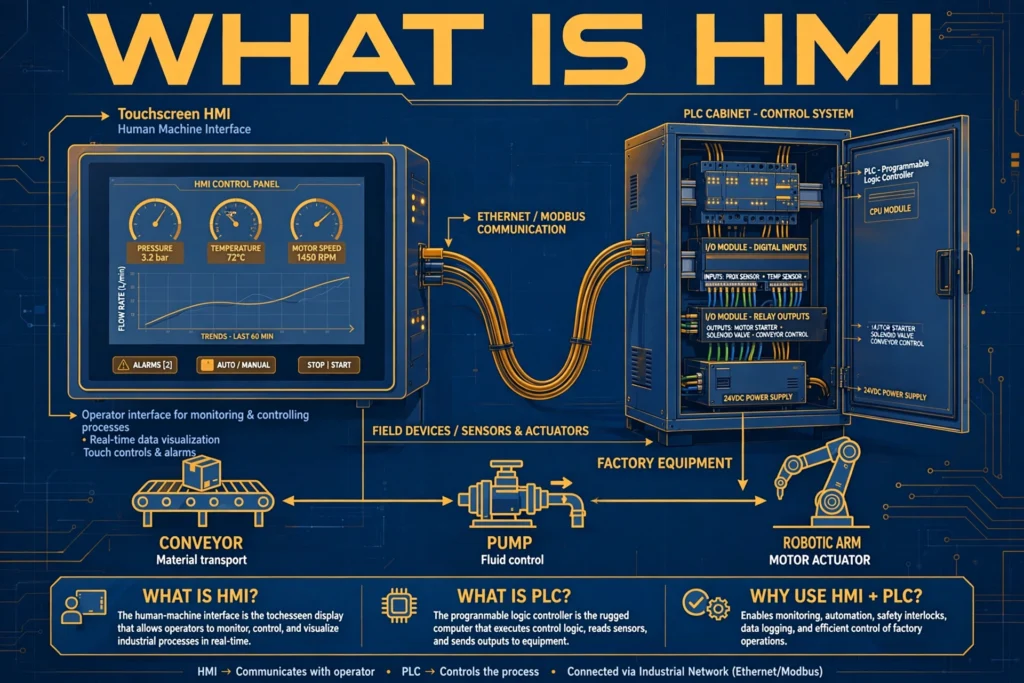
HMI stands for Human Machine Interface. It is the hardware and software layer that lets a human operator monitor and interact with a machine, process, or plant. In its modern form, it is usually a rugged touchscreen panel (or a PC-based display) showing graphical screens: animated pumps and valves, bar graphs of tank levels, trend charts of temperature, lists of active alarms, and buttons for starting, stopping, and adjusting equipment.
The HMI itself does not run the process: it visualizes controller data and forwards operator commands back to it. Think of it this way: the PLC is the brain that executes logic, the field devices (sensors, motors, valves) are the hands, and the HMI is the face — the part humans actually talk to. A well-designed HMI turns thousands of raw signals into a clear picture an operator can understand at a glance, which is why HMI design is as much about human factors as it is about engineering.
Before graphical HMIs, operators used walls of hardwired pushbuttons, selector switches, and pilot lamps. The HMI replaced all of that with software: one screen can show what used to need an entire panel of hardware, and changing the process no longer means rewiring — it means editing screens.
How HMI Works in an Automation System
A typical automation stack has three layers, and the HMI sits in the middle:
- Field level: Sensors (temperature, pressure, level, flow) measure the process; actuators (motors, valves, contactors, variable frequency drives) act on it.
- Control level: The PLC reads the sensors, executes its programmed logic (ladder logic, function blocks, or structured text), and drives the actuators — continuously, in real time, without human involvement.
- Supervision level: The HMI connects to the PLC, reads its data registers, and renders them as graphics. When the operator presses “Start Pump,” the HMI writes a value back to the PLC, and the PLC’s logic acts on it. Above the HMI, a SCADA system may collect data from many PLCs and HMIs across the plant for logging, trending, and management reporting.
Communication between HMI and PLC happens over industrial networks using protocols like Modbus, PROFINET, or EtherNet/IP. The HMI software is configured with tags — named links to specific PLC memory addresses — so that a tank graphic on screen always reflects the real level transmitter, and a start button always writes to the right PLC output.
HMI vs PLC vs SCADA: Key Differences
These three terms are constantly confused. Here is the clean separation:
| Feature | PLC | HMI | SCADA |
|---|---|---|---|
| Full form | Programmable Logic Controller | Human Machine Interface | Supervisory Control and Data Acquisition |
| Role | Executes control logic | Operator interface | Plant-wide supervision |
| Scope | One machine or process cell | One machine or line (local) | Whole plant or multiple sites |
| Hardware | Rugged industrial controller | Touch panel / panel PC | Server + client workstations |
| Makes decisions? | Yes — runs the logic | No — only displays and forwards | Supervisory setpoints and alarming |
| If it fails… | Machine stops | Machine keeps running blind | Plant keeps running; history lost |
Two rules of thumb: the PLC can run without the HMI (the machine keeps working; the operator just cannot see it), and neither the HMI nor SCADA replaces the PLC — if the PLC stops, nothing moves. An HMI connected to a single PLC is not automatically “a SCADA system”; SCADA implies centralized data acquisition, historization, and supervision across many controllers.
Types of HMI
HMIs are classified in a few complementary ways:
By Hardware Form
- Panel HMI (operator panel): A dedicated touchscreen unit (4″ to 21″+) mounted in a control cabinet door or on a machine. Rugged, purpose-built, and the most common type. Limited computing power compared to a PC, but more than enough for visualization.
- PC-based HMI: An industrial PC running HMI software — for complex screens, many connected controllers, or extra computing like databases and analytics.
- Web-based / mobile HMI: The HMI project is served as web pages, viewable from any browser — including tablets and phones. Excellent for remote monitoring, but network security becomes critical.
- Headless / embedded: No local screen at all; the “HMI” is purely software accessed remotely. Common in compact OEM machines.
By Functionality (Traditional Classification)
- Pushbutton replacer: The simplest HMI — a text display with function keys that replaces hardwired buttons and lamps. Still found on basic machines.
- Data handler: Graphical HMI that displays process values, trends, and alarms, and allows setpoint entry and recipe management.
- Overseer: Advanced HMI integrated with SCADA or MES systems, handling plant-wide visualization, reporting, and production management.
Key Functions of an HMI
A modern HMI does far more than show numbers:
- Real-time monitoring: Animated graphics — tanks filling, motors spinning, valves opening — give an instant picture of process state. Color conventions matter: running equipment in green, stopped in grey or red, following standards like ISA-101 for high-performance HMI design.
- Alarm management: When a value exceeds limits, the HMI raises visual and audible alarms, logs them with timestamps, and guides the operator through acknowledgment. Good alarm design (prioritization, shelving, deadbands) prevents the infamous “alarm flood” during upsets.
- Trending: Real-time and historical trend charts of critical variables — temperature, pressure, flow — help operators spot drift before it becomes a fault and help engineers diagnose problems afterward.
- Control actions: Start/stop commands, setpoint changes, mode selection (auto/manual), and recipe or parameter downloads — all interlocked by the PLC’s logic for safety.
- Data logging and recipes: Batch parameters, production counts, and shift data logged locally or forwarded to a historian; recipes let operators switch product configurations with one selection.
- User management: Role-based access — operators, supervisors, maintenance, engineers — so that only authorized personnel can change critical setpoints.
- Diagnostics: Communication status, controller health, and I/O fault indications that speed up troubleshooting.
HMI Communication Protocols
The HMI must speak the controller’s language. The most common protocols:
- Modbus RTU / Modbus TCP: The universal fallback — simple, open, supported by nearly every PLC and drive. Serial (RS-485) for RTU, Ethernet for TCP.
- PROFINET: Siemens’ Industrial Ethernet standard, dominant in European automation.
- EtherNet/IP: Rockwell/Allen-Bradley’s Ethernet protocol, dominant in North America.
- OPC UA: The vendor-neutral standard for secure, platform-independent data exchange — increasingly the bridge between HMI/SCADA and higher-level IT systems.
- MQTT: Lightweight publish/subscribe protocol for IIoT and cloud connectivity; many modern HMIs include an MQTT client.
- Serial (RS-232/RS-485): Still common on small panels and legacy drives.
When selecting an HMI, confirm native driver support for your PLC brand before anything else — protocol converters work but add cost and failure points.
Popular HMI Software Platforms
HMI projects are built in vendor software environments. The names you will meet most often:
- Siemens WinCC / WinCC Unified — pairs with Siemens S7 PLCs (TIA Portal ecosystem).
- Rockwell FactoryTalk View — pairs with Allen-Bradley ControlLogix/CompactLogix.
- AVEVA Edge (formerly InduSoft) — hardware-independent, popular with system integrators.
- Schneider EcoStruxure Operator Terminal Expert — for Magelis panels and Modicon PLCs.
- Mitsubishi GT Works / GOT — for MELSEC controllers.
- Ignition (Inductive Automation) — a modern, unlimited-licensing SCADA/HMI platform gaining fast adoption.
Most platforms share the same core toolset: a graphics editor, tag database, alarm configuration, trend objects, scripting, and communication drivers.
Applications of HMI
- Manufacturing: Machine control panels for packaging lines, CNC cells, and assembly stations — start/stop, speed setpoints, fault diagnostics.
- Water and wastewater treatment: Pump station control, tank levels, flow totals, and alarm handling across distributed sites.
- Power and substations: Breaker status, feeder loading, and interlocking displays for operators.
- Food & beverage / pharmaceuticals: Batch recipe management, clean-in-place sequencing, and audit-trail logging for regulatory compliance.
- Building automation: HVAC, lighting, and access control supervised from a central HMI.
- Oil & gas / chemicals: Process graphics with strict alarm management in hazardous-area-rated panels.
- Renewable energy: Solar inverter plants use HMIs and SCADA dashboards to monitor string performance, irradiance, and grid compliance.
HMI Selection and Design Tips
- Size the screen to the task: A pump station needs 7″; a line overview benefits from 15″+. Operators should see the essentials without scrolling.
- Match the environment: Check IP ratings (IP65 front for washdown areas), operating temperature, sunlight readability, and hazardous-area certifications where required.
- Follow ISA-101 high-performance HMI principles: muted grey backgrounds, color reserved for abnormal states, consistent navigation. Calm, standardized screens measurably reduce operator error during upsets.
- Plan the tag structure early: A clean, hierarchical tag naming convention pays off the moment the project grows beyond one screen.
- Secure it: Change default passwords, disable unused services, segment the OT network, and treat any web or mobile access as a cybersecurity boundary.
FAQs
Can an HMI work without a PLC?
Generally no — an HMI is a window, not a brain. It needs a controller (PLC, RTU, or smart drive) to supply process data and execute logic. Some modern panels include soft-PLC runtimes or basic scripting, but they cannot replace a real PLC in demanding applications.
What is the difference between HMI and SCADA?
An HMI is the local operator interface for one machine or line. SCADA is the supervisory layer above it: it aggregates data from many PLCs and HMIs, maintains historical databases, manages plant-wide alarming, and serves multiple users across sites. An HMI can exist without SCADA; SCADA normally includes HMI functionality.
Which communication protocol should I use for HMI-PLC links?
Use whatever your PLC speaks natively — PROFINET for Siemens, EtherNet/IP for Allen-Bradley, Modbus TCP as the universal fallback. Native drivers are always more reliable than protocol converters.
What is WinCC?
WinCC is Siemens’ HMI/SCADA software family (classic WinCC flexible/Advanced and the newer WinCC Unified), used to build operator screens for Siemens S7 PLCs inside the TIA Portal engineering environment.
Are touchscreens reliable in industrial environments?
Yes, when specified correctly. Industrial panels use resistive or projected-capacitive touch rated for millions of operations, with IP65-sealed fronts against dust and water. For gloved operation in some industries, resistive touch or added physical buttons are preferred.
What does “high-performance HMI” mean?
A design philosophy (formalized in ISA-101) that replaces flashy, colorful graphics with calm, standardized screens where color is reserved for abnormal conditions. The goal is faster abnormal-situation recognition and fewer operator errors.
Conclusion
An HMI is simple to describe — the screen between the human and the machine — but getting it right takes real engineering. It must show the right information at the right time, let operators act safely and quickly, communicate flawlessly with the PLC below it, and often feed the SCADA system above it. Choose the hardware for the environment, the software for your controller ecosystem, and the screen design for the operator under stress — not for the demo.
As plants add more variable frequency drives, smart instruments, and IIoT connectivity, the HMI’s job keeps growing: from a local panel to a secure window into the entire operation. Master the PLC–HMI–SCADA stack, and you understand the nervous system of modern industry.