
Introduction
Walk into any modern bottling plant and you will see hundreds of bottles moving on conveyors, being filled, capped, and labeled — all without a single person touching them. Behind a steel cabinet door, a small box with blinking lights controls everything. That box is a PLC.
Before PLCs existed, factories used rooms full of electromechanical relays wired together to automate machines. Changing the process meant rewiring the entire panel — a job that took days. The programmable logic controller replaced all of that with software, and industrial automation has never looked back.
In this guide, you will learn what a PLC is, how the PLC working principle operates through its scan cycle, the main types, components, and where PLC applications are found. You will also see the PLC advantages and disadvantages explained in simple, beginner-friendly English.
What Is a PLC?
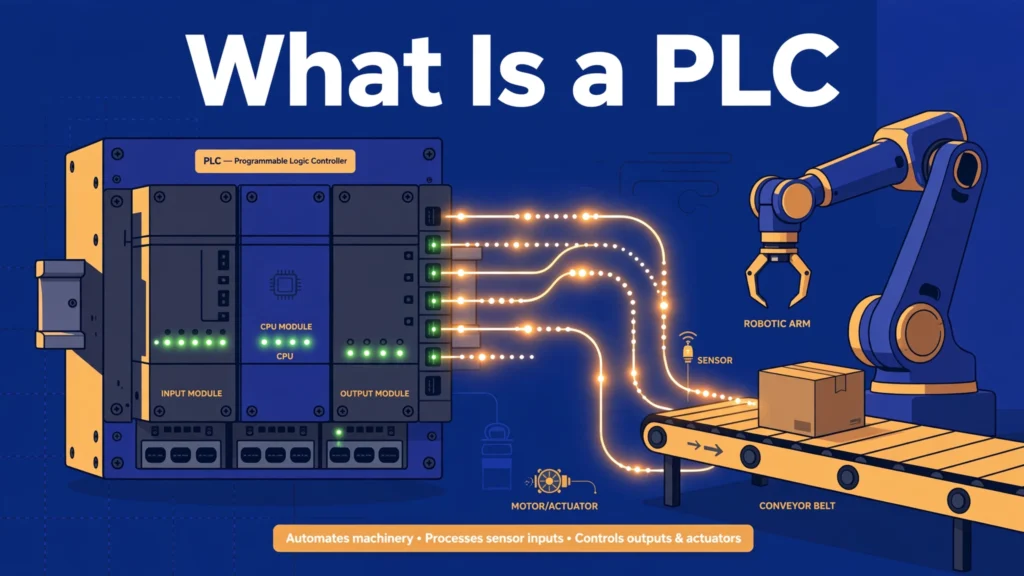
A PLC (Programmable Logic Controller) is an industrial digital computer designed to control machines and processes. It continuously reads signals from input devices like sensors and switches, makes decisions based on a program written by an engineer, and sends commands to output devices like motors, valves, and lights.
Think of a PLC as the brain of a machine, with nerves going in and out. Its “eyes and ears” are the inputs — a photoelectric sensor that sees a bottle, a push button pressed by an operator. Its “hands” are the outputs — a motor that starts a conveyor, a solenoid valve that opens. The program is its thinking: “if the sensor sees a bottle AND the start button is pressed, then run the conveyor.”
A practical example: in a car wash, a PLC reads a coin acceptor (input), starts the water pumps and brushes in the correct sequence (outputs), times each stage, and stops everything when the cycle ends. If the owner wants to add an extra rinse stage, the engineer simply edits the program — no rewiring needed.
Working Principle
The PLC working principle is based on a repeating cycle called the scan cycle. The PLC does the same three steps over and over, hundreds or thousands of times per second:
- Step 1 — Read inputs: The PLC scans all input terminals and copies their ON/OFF (or analog) states into its memory. This snapshot is called the input image table.
- Step 2 — Execute the program: The PLC runs the user program from top to bottom, using the input snapshot. It evaluates logic — AND, OR, timers, counters — and decides which outputs should be ON or OFF, storing results in the output image table.
- Step 3 — Update outputs: The PLC copies the output image table to the physical output terminals, switching motors, lamps, and valves accordingly. Then the cycle repeats from Step 1.
A simple analogy: imagine a chef who repeats the same routine — check all the orders on the board, cook according to the recipes, serve the dishes — then starts over. The PLC is that chef, and the scan cycle is the routine. Because the cycle takes only a few milliseconds, the control feels instant to human eyes.
Programs are most often written in ladder logic, a graphical language that looks like electrical relay diagrams, with rungs, contacts, and coils. Electricians find it intuitive because it mirrors the relay panels PLCs replaced. Other languages include function block diagrams and structured text.
Types of PLC
Compact (Fixed) PLC
A compact PLC has a fixed number of inputs and outputs built into one unit. You cannot add expansion modules. These are cheap, small, and perfect for simple machines like a single conveyor or a packaging machine with a dozen signals. Popular examples are used widely in small automation projects.
Modular PLC
A modular PLC sits on a rack where you plug in separate modules: CPU, power supply, digital input, digital output, analog, and communication modules. You can build exactly the system you need and expand it later. Modular PLCs run entire production lines and process plants. They cost more but offer the most flexibility and power.
Soft PLC
A soft PLC is software that runs on an industrial PC instead of dedicated hardware. It gives PC-level computing power for complex tasks like vision inspection or data logging, while still doing PLC-style control. It needs a reliable operating system setup to guarantee real-time behavior.
Safety PLC
A safety PLC is designed for safety-critical functions like emergency stops and guard doors. It uses redundant processors and certified safety programming to meet standards such as IEC 61508. When human safety depends on the control system, a safety PLC is mandatory.
Main Components
- CPU (processor): Executes the program and manages the scan cycle. The heart of the PLC.
- Memory: Stores the user program, input/output image tables, and data like timer values. Part of it is non-volatile, so the program survives power loss.
- Power supply: Converts mains AC to the low-voltage DC the PLC electronics need, and often powers input sensors too.
- Input modules: Connect to sensors, switches, and push buttons. They isolate field voltages from the delicate CPU electronics using optocouplers.
- Output modules: Drive contactors, solenoid valves, indicator lamps, and drives. Available as relay, transistor, or triac types.
- Communication ports/modules: Connect the PLC to HMIs (touch screens), other PLCs, SCADA systems, and industrial networks like Modbus, Profibus, or Ethernet/IP.
- Programming device: Usually a laptop with the manufacturer’s software, used to write, download, and monitor the program.
Advantages
- Easy to reprogram: Changing the machine’s behavior means editing software, not rewiring panels. A process change that took days with relays now takes minutes.
- Reliable in harsh conditions: PLCs are built for factories — they tolerate heat, dust, vibration, and electrical noise far better than ordinary computers.
- Compact: One small PLC replaces cabinets full of relays, timers, and counters, saving panel space and wiring.
- Powerful diagnostics: Engineers can monitor the program live on a laptop, see exactly which input or rung is active, and find faults in minutes.
- Flexible expansion: Modular PLCs grow with the plant — just plug in more I/O modules as new machines are added.
- Communication ready: PLCs talk to HMIs, SCADA, and other controllers, making them the foundation of modern smart factories.
Disadvantages and Limitations
- Higher upfront cost: For a very simple task with two or three relays, a PLC can be overkill — a few relays are cheaper.
- Skilled programming needed: Someone must learn ladder logic and the manufacturer’s software. Bad programming causes bad machine behavior.
- Vendor dependence: Programs and hardware are often brand-specific. Switching brands later can mean rewriting everything.
- Scan time limits: Extremely fast events (microsecond level) may be missed between scans. High-speed counter modules solve this but add cost.
- Cybersecurity risk: Networked PLCs can be attacked. Stuxnet famously showed that industrial controllers need proper network security.
- Not ideal for complex math: Heavy calculations, vision processing, and advanced algorithms are better handled by PCs or dedicated controllers.
Applications
- Manufacturing lines: Assembly, packaging, bottling, and labeling — the classic PLC territory.
- Process industries: Chemical, food, and pharmaceutical plants use PLCs to control temperature, pressure, flow, and mixing.
- Building automation: HVAC, lighting, elevators, and access control in large buildings often run on PLC-based controllers.
- Water treatment: Pumps, valves, and chemical dosing in water and wastewater plants are PLC-controlled.
- Automotive: Car factories use thousands of PLCs for welding robots, paint shops, and conveyor systems.
- Energy: Substation automation, solar plant monitoring, and generator control use rugged PLCs.
- Traffic and infrastructure: Tunnel ventilation, bridge controls, and amusement rides rely on PLCs for safe sequencing.
PLC Comparison
| Feature | Compact PLC | Modular PLC | Relay Panel |
|---|---|---|---|
| I/O capacity | Fixed, small (10–40 points) | Expandable (1000s of points) | Limited by panel size |
| Flexibility | Low | Very high | Very low (rewire needed) |
| Cost | Low | Medium–high | Low initial, high changes |
| Best for | Single small machines | Lines and plants | Very simple fixed tasks |
| Diagnostics | Good | Excellent | Poor (manual tracing) |
| Programming | Ladder logic | Ladder, FBD, ST | None (hardwired) |
| Change effort | Minutes | Minutes | Hours to days |
How to Choose the Right PLC
Start by counting your inputs and outputs. List every sensor, switch, motor, valve, and lamp the machine needs, then add 20 percent spare for future additions. If the total is under 30 points and will never grow, a compact PLC is the economical choice. For anything bigger or likely to expand, go modular.
Next, check speed and special functions. Standard digital control is easy for any PLC, but high-speed counting, precise positioning, or analog control (temperature, pressure) may need special modules. Also consider communication: if the PLC must talk to a touch screen, a SCADA system, or other machines, confirm it supports the required protocol such as Modbus or Ethernet/IP.
Think about environment and support. Choose a PLC rated for your plant’s temperature, dust, and vibration levels. Just as important is local support — pick a brand your team already knows or that has good local distributors, because training and spare parts matter more than small price differences.
Beginner tips: start with ladder logic, since it matches electrical drawings you already understand. Always document your program with comments and tag descriptions — the next engineer will thank you. And keep a backup of every program version; a lost program can stop a factory.
Common Problems and Solutions
Q: Why is my PLC not responding to an input?
A: Check the input LED on the module first. If it is off, the problem is in the field — a broken sensor wire, failed sensor, or missing sensor power supply. If the LED is on but the program ignores it, check your addressing and logic.
Q: What is the difference between a PLC and a microcontroller like Arduino?
A: A PLC is an industrial, ruggedized controller with standardized I/O, 24 V industrial signals, and ladder logic programming. A microcontroller board is cheaper and great for learning and prototypes, but it is not built for factory reliability, noise immunity, or 24/7 operation.
Q: Why does my output flicker or chatter?
A: Usually a noisy input or a program bug, such as a timer set too short or conflicting rungs driving the same output. Add input filtering or debounce logic, and make sure each output is controlled by only one rung.
Q: How do I connect a sensor to a PLC input?
A: Match the sensor type to the module: PNP sensors source current to the input, NPN sensors sink it. Wire the sensor power correctly (usually 24 V DC), connect the signal wire to the input terminal, and confirm the input LED lights when the sensor activates.
Q: What causes a PLC to go into fault or stop mode?
A: Common causes are power supply problems, a disconnected I/O module, memory errors, or a programming fault such as an infinite loop. Check the CPU fault LED and read the diagnostic buffer in the programming software.
Q: Can one PLC control multiple machines?
A: Yes, if it has enough I/O and scan time. Modular PLCs routinely control whole production lines. Just keep the program organized with separate sections per machine so troubleshooting stays easy.
Future Trends
PLCs are merging with IT. Modern controllers support MQTT, OPC UA, and cloud connectivity, sending production data straight to dashboards and analytics platforms. The line between PLC, edge computer, and IIoT gateway is getting thinner every year.
Programming is also evolving. While ladder logic remains dominant, structured text (similar to Pascal) is growing for complex algorithms, and some vendors now support Python-style scripting for data tasks. Cybersecurity features — encrypted communication, user authentication, signed firmware — are becoming standard after high-profile industrial attacks.
Looking ahead, artificial intelligence will assist PLC work rather than replace it: auto-generated diagnostics, predictive maintenance suggestions, and program verification tools. But the core job — reliably reading inputs and driving outputs in milliseconds, year after year — will keep the PLC at the heart of industry for decades.
Conclusion
A PLC is the brain of modern automation: it reads inputs, executes a program in a fast scan cycle, and drives outputs — reliably, for years, in harsh factory conditions. From a single packaging machine to an entire car plant, PLCs replaced rooms of relays with flexible software that can be changed in minutes instead of days.
Choosing the right PLC means counting your I/O, planning for growth, and picking a brand your team can support. Learn ladder logic, document everything, and always keep program backups. Whether you are a student, technician, or engineer, PLC skills open doors across every industry. Keep practicing, stay curious, and build something that moves.