
Imagine a modern factory where a conveyor moves products, sensors detect each item, motors start and stop, and valves open at the right time. All these actions must happen in the correct order.
If workers had to control every action manually, production would be slow and mistakes would be common. A PLC panel helps solve this problem by providing a central control system that can automatically monitor equipment and make decisions based on programmed instructions.
A PLC panel is widely used in manufacturing plants, water treatment systems, HVAC equipment, packaging machines, material-handling systems, and many other automated processes. For electrical students, engineers, and technicians, understanding PLC panels is important because industrial automation depends heavily on them.
In this guide, you will learn what is PLC panel, how it works, its types, main components, advantages and disadvantages, applications, selection methods, common problems, and future trends. You will also learn the PLC panel working principle through a simple step-by-step example.
What Is PLC Panel?
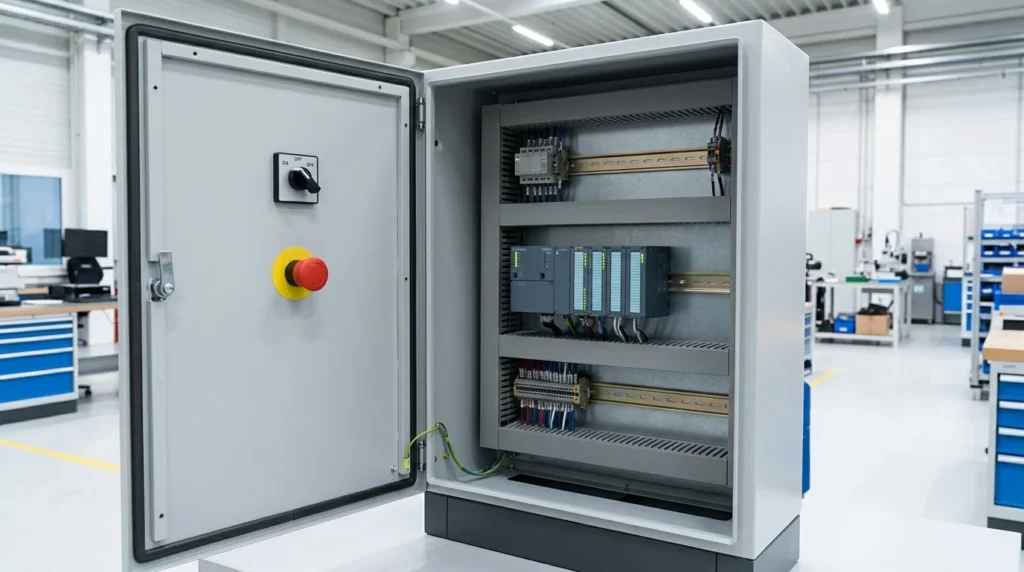
A PLC panel is an electrical control panel that contains a Programmable Logic Controller (PLC) and other electrical and control components used to monitor and control machines or industrial processes.
In simple words, a PLC panel is the control center of an automated system.
The PLC receives information from field devices such as sensors and switches. It processes that information according to a program and then sends commands to output devices such as motors, valves, contactors, and indicator lamps.
A basic control process looks like this:
Sensors → PLC Inputs → PLC CPU → PLC Outputs → Actuators/Machines
Simple Practical Example
Consider a conveyor system in a factory.
A sensor detects a box arriving on the conveyor. The PLC receives the sensor signal and checks its programmed instructions.
The PLC may then:
- Start the conveyor motor.
- Detect the box position.
- Stop the conveyor.
- Activate a pneumatic valve.
- Restart the conveyor.
- Send the machine status to an operator screen.
All these actions can happen automatically.
What Does PLC Stand For?
PLC = Programmable Logic Controller
A PLC is an industrial computer designed to control machines and processes.
A PLC panel provides the electrical environment needed to operate the PLC and connect it with field equipment.
PLC Panel Working Principle
The PLC panel working principle is based on a repeated cycle of reading inputs, processing a program, and updating outputs.
Think of a PLC like a manager in a factory.
- Sensors provide information.
- PLC makes decisions.
- Output devices perform the required actions.
Step 1: Power Enters the Panel
Electrical power enters the PLC panel through an incoming supply.
The panel may contain:
- Main circuit breaker
- Fuses
- Power supply
- Protection devices
The power supply provides the correct voltage required by the PLC and control equipment.
Step 2: Sensors Send Signals
Field devices provide information to the PLC.
Examples include:
- Proximity sensors
- Photoelectric sensors
- Limit switches
- Pressure switches
- Temperature sensors
- Level switches
- Push buttons
These devices tell the PLC what is happening in the process.
Step 3: PLC Reads the Inputs
The PLC’s input modules receive electrical signals from field devices.
For example:
Sensor ON → PLC input becomes ON.
The PLC continuously checks these signals.
Step 4: PLC Executes the Program
The PLC CPU processes the input information according to its programmed logic.
A simple program might say:
If the start button is ON and the safety circuit is healthy, start the motor.
The PLC can make thousands of such decisions depending on its program.
Step 5: PLC Activates Outputs
After processing the program, the PLC sends signals through its output modules.
Outputs may control:
- Contactors
- Relays
- Solenoid valves
- Motor starters
- VFDs
- Indicator lamps
- Alarms
Step 6: Equipment Responds
The connected device performs the required action.
For example:
PLC output ON → Contactor ON → Motor starts
Step 7: The Cycle Repeats
The PLC repeats this process continuously:
Read inputs → Execute program → Update outputs → Repeat
This happens very quickly, allowing machines to respond automatically to changing conditions.
Types of PLC Panels
PLC panels can be classified according to their application, PLC design, and control requirements.
1. Compact PLC Panel
A compact PLC combines several PLC functions in a relatively small unit.
It is suitable for smaller machines and simple automation systems.
Typical applications include:
- Small conveyors
- Pumps
- Simple packaging machines
- Small production equipment
2. Modular PLC Panel
A modular PLC allows separate modules to be added or removed.
A system may include:
- CPU module
- Digital input modules
- Digital output modules
- Analog input modules
- Analog output modules
- Communication modules
This makes modular PLC systems suitable for larger and more complex applications.
3. Rack-Mounted PLC Panel
Rack-mounted PLC systems use a rack or backplane to hold different modules.
They are commonly used in larger industrial automation systems where many inputs, outputs, and communication devices are required.
4. Safety PLC Panel
A safety PLC is designed for applications requiring specific safety functions.
It may be used with:
- Emergency stops
- Safety switches
- Light curtains
- Safety interlocks
- Machine guards
Safety systems must be designed according to the required safety standards and risk assessment.
5. Remote I/O PLC Panel
Remote I/O systems place input and output modules closer to field devices.
Communication connects these remote modules to the main PLC.
This can reduce long control cable runs in large facilities.
6. PLC Panel With HMI
Many modern PLC panels include an HMI (Human-Machine Interface).
The HMI allows operators to:
- Start and stop equipment
- View alarms
- Monitor process values
- Change permitted settings
- View machine status
Main Components of a PLC Panel
A PLC panel contains more than just a PLC. Several components work together to provide control and protection.
Main Circuit Breaker
The main breaker controls the electrical supply entering the panel.
It provides isolation and protection for the panel’s electrical circuits.
PLC CPU
The CPU is the main processing unit.
It executes the control program and makes decisions based on input information.
Digital Input Module
Digital inputs receive ON/OFF signals.
Examples include:
- Push buttons
- Limit switches
- Proximity sensors
- Selector switches
Digital Output Module
Digital outputs send ON/OFF signals to devices such as:
- Relays
- Contactors
- Solenoid valves
- Indicator lamps
Analog Input Module
Analog inputs receive variable signals representing measurements such as:
- Temperature
- Pressure
- Flow
- Level
- Speed
Common industrial signal ranges include 4–20 mA and 0–10 V, depending on the equipment and system design.
Analog Output Module
Analog outputs can provide variable control signals.
For example, a PLC can send a signal to a control device to adjust:
- Motor speed
- Valve position
- Heating level
24 V DC Power Supply
A DC power supply commonly provides control voltage for PLC equipment, sensors, relays, and other control circuits.
The exact voltage depends on the system design.
Relays
Relays can provide electrical isolation or allow PLC outputs to control devices requiring different electrical characteristics.
Terminal Blocks
Terminal blocks provide organized connection points for field wiring.
They make testing, maintenance, and cable identification easier.
Contactors
Contactors are used when the PLC needs to control larger electrical loads such as motors.
The PLC usually controls the contactor coil rather than directly switching the motor’s high current.
VFD
A Variable Frequency Drive can be connected to a PLC when variable motor speed is required.
The PLC may send a start/stop command or a speed reference to the VFD.
HMI
An HMI provides a visual interface between the operator and the automation system.
It may display:
- Motor status
- Temperature
- Pressure
- Alarm messages
- Production information
Communication Modules
Communication modules allow the PLC to exchange data with:
- HMIs
- VFDs
- Remote I/O
- SCADA systems
- Other PLCs
- Industrial networks
Cooling Fan and Ventilation
Some PLC panels require ventilation or cooling to control internal temperature.
Excessive heat can shorten the life of electronic equipment.
Panel Enclosure
The enclosure protects internal components from accidental contact and environmental conditions.
The enclosure type should match the installation environment.
PLC Panel Advantages and Disadvantages
Understanding PLC panel advantages and disadvantages helps engineers decide whether PLC-based control is suitable for a project.
Advantages
- Automation: Machines can operate automatically with minimal manual control.
- Flexible programming: Control logic can be changed through software.
- Fast operation: PLCs can process inputs and outputs very quickly.
- Easy troubleshooting: Diagnostic information can help technicians locate faults.
- Reduced control wiring: Complex relay logic can often be replaced by software logic.
- Expandable systems: Many PLC systems can accept additional I/O and communication modules.
- Process monitoring: PLCs can collect and process operational data.
- Communication: PLCs can connect with HMIs, SCADA, drives, and other systems.
- Reliable operation: Industrial PLCs are designed for demanding operating environments.
- Precise control: PLCs can coordinate many machine operations accurately.
Disadvantages and Limitations
- Initial cost: PLC hardware and panel construction can be expensive for small applications.
- Programming knowledge required: Technicians need PLC programming skills.
- Electronic failure: PLC modules and power supplies can fail.
- Software dependency: A control problem may require knowledge of the PLC program.
- Environmental concerns: Excessive heat, moisture, dust, or electrical interference can cause problems.
- Cybersecurity risks: Network-connected PLC systems require suitable security controls.
- Complex troubleshooting: Large automation systems can be difficult to diagnose without proper documentation.
PLC Panel Applications
PLC panel applications are found in many industries where automatic control is required.
Manufacturing Plants
PLCs control:
- Assembly machines
- Production lines
- Conveyors
- Packaging systems
- Robotic equipment
- Material handling
Water Treatment Plants
PLC panels can control:
- Water pumps
- Chemical dosing
- Filtration systems
- Level control
- Pressure systems
- Treatment processes
HVAC Systems
PLCs can control:
- Fans
- Pumps
- Chillers
- Heating systems
- Air-handling units
- Temperature control
Food Processing
Automation can control:
- Conveyors
- Filling machines
- Mixing equipment
- Packaging machines
- Temperature systems
Oil and Gas Facilities
PLC systems can monitor and control many industrial processes and equipment.
Safety-critical applications require properly designed safety systems and suitable equipment.
Building Automation
PLC-based control can be used for:
- Pumps
- Ventilation
- Water systems
- Lighting control
- HVAC equipment
Renewable Energy
PLC systems can support monitoring and control functions in:
- Solar installations
- Battery systems
- Energy-management systems
- Pumping systems
Modern Industrial Automation
Modern PLC panels can connect to:
- SCADA
- HMI
- Industrial Ethernet
- Remote I/O
- Cloud-connected monitoring systems
- Industrial databases
Difference Between PLC Panel and MCC Panel
The difference between PLC panel and MCC panel is mainly their purpose.
A PLC panel focuses on control and automation, while an MCC panel focuses on motor power control and protection.
| Feature | PLC Panel | MCC Panel |
|---|---|---|
| Main purpose | Automation and control | Motor control and power distribution |
| Main device | PLC | Motor starters/VFDs/breakers |
| Sensors | Common | Usually connected through control system |
| Programming | Required | Usually limited or external |
| Contactors | May be used | Common |
| Overload relays | Possible in control system | Common |
| VFDs | Can communicate with VFDs | Can contain VFDs |
| HMI | Common | Optional |
| Main role | Decision-making | Motor switching/protection |
| Typical application | Automated process | Multiple motor systems |
In many industrial plants, both panels work together.
For example:
PLC Panel → Control command → MCC → Motor
The PLC decides when and how equipment should operate, while the MCC provides much of the motor power switching and protection.
Selection Guide for a PLC Panel
Choosing the right PLC panel starts with understanding the process.
1. Count Digital Inputs
List all ON/OFF devices, such as:
- Push buttons
- Proximity sensors
- Limit switches
- Pressure switches
Then select enough digital inputs with reasonable spare capacity.
2. Count Digital Outputs
List devices the PLC needs to control:
- Relays
- Contactors
- Solenoid valves
- Indicator lamps
3. Determine Analog I/O
If the system measures temperature, pressure, flow, or level, determine the number and type of analog signals.
4. Check Communication Requirements
Decide whether the PLC needs to communicate with:
- HMI
- VFD
- SCADA
- Remote I/O
- Other PLCs
5. Consider Future Expansion
Do not design a panel only for today’s requirements.
Where practical, leave spare I/O, panel space, power capacity, and communication capacity for future changes.
6. Check Environmental Conditions
Consider:
- Temperature
- Dust
- Humidity
- Vibration
- Corrosive gases
- Electrical noise
7. Select the Right PLC Family
Choose the PLC based on:
- I/O requirements
- Processing requirements
- Communication needs
- Programming environment
- Expansion capability
- Support availability
8. Plan Panel Layout
Keep power and control wiring properly arranged.
Sensitive signal wiring should be routed carefully to reduce electrical interference.
Beginner Tip
Before buying a PLC, make an I/O list.
This simple document can prevent many design mistakes.
Common PLC Panel Problems and Solutions
Why Is the PLC Not Turning On?
Possible causes include:
- No incoming power
- Blown fuse
- Power supply failure
- Loose wiring
- Incorrect supply voltage
Solution: Check the power supply and protection devices using approved electrical testing procedures.
Why Is a PLC Input Not Working?
Possible causes include:
- Faulty sensor
- Broken cable
- Incorrect wiring
- No sensor power
- Faulty input channel
Check the sensor and wiring first. Then verify whether the input indicator changes when the sensor operates.
Why Is a PLC Output Not Working?
Possible causes include:
- Incorrect program logic
- Output module fault
- Missing control power
- Interlock active
- Faulty relay or contactor
Check the PLC program status, output indication, wiring, and controlled device.
Why Does the PLC Keep Restarting?
Possible causes include:
- Unstable power supply
- Loose connections
- Power supply overload
- Excessive electrical interference
- Hardware problem
Check the control power supply and panel wiring before replacing PLC components.
Why Is Communication Lost?
Possible causes include:
- Damaged network cable
- Incorrect communication settings
- Network device failure
- Address conflict
- Power loss
Check the communication status and network configuration.
Why Does the PLC Panel Get Hot?
Possible causes include:
- Poor ventilation
- High ambient temperature
- Overloaded power supply
- Excessive heat from nearby equipment
- Blocked ventilation filters
Check the panel temperature and cooling arrangement.
Safety: PLC panels may contain dangerous electrical voltages. Troubleshooting should be performed by qualified personnel using proper isolation, testing, and site safety procedures.
Future Trends in PLC Panels
PLC technology continues to develop as factories become more connected and automated.
Industrial IoT
PLCs are increasingly connected to industrial networks and data systems.
This allows machines to share operating information with higher-level systems.
Remote Monitoring
Technicians can monitor machine status, alarms, and process data from centralized control rooms.
Predictive Maintenance
PLC systems can collect operating data that helps maintenance teams identify abnormal conditions before equipment fails.
Edge Computing
Some modern automation architectures process data closer to the machines.
This can reduce delays and improve real-time monitoring.
Artificial Intelligence Integration
Industrial systems are increasingly using advanced analytics and AI-based tools to analyze machine and process data.
The PLC generally remains responsible for real-time control, while higher-level systems can analyze collected data.
Wireless Connectivity
Wireless industrial communication can reduce some cable requirements and make remote monitoring easier.
However, reliability, cybersecurity, and environmental conditions must be considered carefully.
Energy Monitoring
PLC systems can monitor energy use and help facilities identify inefficient equipment.
This is becoming more important as industries focus on energy efficiency.
Digital Twins
Digital models of machines and processes can work with automation data to improve testing, optimization, and maintenance planning.
FAQs About PLC Panels
What is a PLC panel?
A PLC panel is an electrical control panel containing a Programmable Logic Controller and related equipment used to automatically control machines and processes.
What does PLC stand for?
PLC stands for Programmable Logic Controller.
What is the main function of a PLC panel?
Its main function is to receive input signals, process programmed logic, and control output devices automatically.
What are the main components of a PLC panel?
Common components include a PLC CPU, input and output modules, power supply, circuit breakers, relays, terminal blocks, communication devices, and sometimes an HMI.
What is the difference between PLC and MCC?
A PLC is mainly used for control and automation, while an MCC is mainly used for motor control, switching, and protection.
Can a PLC control a motor?
Yes. A PLC can control a motor indirectly through equipment such as a contactor, motor starter, soft starter, or VFD.
Is an HMI required in every PLC panel?
No. A PLC can operate without an HMI. However, an HMI is useful when operators need to view information, alarms, and controls.
Conclusion
A PLC panel is the control center of many modern automated electrical systems. It combines a Programmable Logic Controller with power supplies, input and output modules, relays, terminals, communication equipment, and other control components.
The basic PLC panel working principle is simple: the PLC reads inputs, processes its program, and controls outputs. This allows machines to perform complex tasks automatically and repeatedly.
PLC panels are used in manufacturing, water treatment, HVAC, food processing, energy systems, material handling, and many other industrial applications. They can also connect with HMIs, SCADA systems, VFDs, remote I/O, and industrial networks.
For beginners, the best way to learn PLC systems is to start with digital inputs and outputs, then move to analog signals, PLC programming, communication, and troubleshooting. A strong understanding of electrical control circuits will make PLC learning much easier.