
You are working on an important project on your computer. Suddenly, the main power supply fails. The screen goes black, unsaved data is lost, and your system shuts down instantly. In hospitals, this kind of power failure can stop life-saving equipment. In data centers, it can cause huge financial loss.
This is where a UPS working system becomes critical.
UPS stands for Uninterruptible Power Supply. It provides instant backup power when the main supply fails. Unlike generators, a UPS reacts within milliseconds, so there is no interruption.
For electrical students, engineers, and technicians, understanding the UPS working system is essential. It is widely used in homes, offices, industries, hospitals, and IT infrastructure.
In this detailed guide, you will learn:
- What is UPS working system
- UPS working system working principle
- Types of UPS
- Components and their functions
- UPS working system applications
- UPS working system advantages and disadvantages
- Difference between UPS and inverter
- Selection tips and troubleshooting
Let’s understand it step by step.
2. What Is UPS Working System?
A UPS working system is an electrical device that provides emergency power to a load when the main input power source fails.
In simple words:
A UPS is a backup power system that gives instant electricity during power cuts.
Practical Example
Think of a computer system. If power fails:
- Without UPS → Computer shuts down immediately.
- With UPS → Computer keeps running for several minutes.
This allows the user to save data and safely shut down.
So, UPS working system means continuous and uninterrupted power supply for critical equipment.
3. UPS Working System Working Principle
To understand UPS working system working principle, we must see how it behaves in two conditions:
- Normal mode
- Power failure mode
Step-by-Step Working
1. Normal Condition (Main Supply Available)
- AC input comes from mains.
- UPS passes power to load.
- At the same time, battery is charging.
2. Power Failure Condition
- Mains supply stops.
- Battery instantly supplies DC power.
- Inverter section converts DC to AC.
- Load continues working without interruption.
3. When Power Returns
- UPS switches back to mains.
- Battery starts charging again.
Simple Analogy
Think of UPS like a water tank with automatic switching:
- Main water supply = utility power
- Tank = battery
- Pump = inverter
If main supply stops, tank water flows automatically.
That is the core UPS working system working principle.
4. Types / Classification of UPS
UPS systems are mainly classified into three types.
Offline UPS (Standby UPS)
An Offline UPS, also called a Standby UPS, is a basic type of Uninterruptible Power Supply used to provide backup power during electricity failures. It is commonly used for personal computers, small office equipment, routers, and home electronics. Under normal conditions, the Offline UPS allows the main utility power to pass directly to the connected devices while simultaneously charging its internal battery. The inverter section remains inactive during this time. When a power outage, voltage drop, or sudden interruption occurs, the UPS automatically switches to battery mode and supplies power through the inverter. This switching process usually takes a few milliseconds, but most electronic devices can continue operating without interruption. The main advantage of an Offline UPS is its simple design, low cost, compact size, and energy efficiency. It is considered an economical solution for users who need short-term backup power and basic protection against power failures. Offline UPS systems also provide protection from voltage spikes and surges that may damage sensitive electronic equipment. However, they are not suitable for highly sensitive industrial machines or critical medical systems because the transfer time is slightly slower compared to online UPS systems. Proper installation and maintenance are important for reliable operation. The UPS should be placed in a cool, dry, and ventilated area to prevent overheating. Batteries must be checked regularly, and the unit should not be overloaded beyond its rated capacity. Periodic testing helps ensure that the battery and inverter are functioning correctly. Users should also keep the UPS clean and avoid exposure to moisture or dust. Overall, the Offline UPS is a practical and affordable backup power solution that helps protect electronic devices from unexpected power interruptions and ensures temporary continuity of operation during electrical failures.
- Simplest type.
- Normally supplies power directly from mains.
- Switches to battery during power failure.
Advantages:
- Low cost
- Suitable for home PCs
Disadvantage:
- Small switching delay
Line-Interactive UPS
A Line-Interactive UPS is an advanced type of Uninterruptible Power Supply designed to provide reliable backup power and voltage regulation for computers, servers, networking devices, and office equipment. It is more efficient and protective than an Offline UPS because it can automatically regulate voltage fluctuations without switching to battery power every time the input voltage changes. In normal operating conditions, the utility power supplies electricity directly to the connected equipment while the UPS charges its internal battery. The special feature of a Line-Interactive UPS is its Automatic Voltage Regulation (AVR) system, which can increase low voltage and reduce high voltage without using the battery. This helps protect electronic devices from power surges, brownouts, and voltage instability while extending battery life. When a complete power failure occurs, the UPS quickly switches to battery mode through its inverter and continues supplying power to the connected load with minimal interruption. The transfer time is very short, making it suitable for sensitive electronic devices that require continuous operation. Line-Interactive UPS systems are widely used in homes, offices, banks, educational institutions, and small data centers because they offer a balance between cost, efficiency, and protection. They are especially useful in areas where voltage fluctuations are common. Proper installation and maintenance are important for safe and efficient operation. The UPS should be installed in a clean, dry, and ventilated place to prevent overheating. Regular battery inspection, cleaning of ventilation openings, and periodic testing of backup performance help maintain reliability. Users should avoid overloading the UPS beyond its rated capacity because excessive load can reduce backup time and damage internal components. Compared to Offline UPS systems, Line-Interactive UPS units provide better voltage correction and power protection, although they are generally more expensive. Overall, a Line-Interactive UPS is an efficient and dependable power backup solution that ensures stable power supply, protects sensitive electronic equipment, and minimizes the risk of data loss and hardware damage during electrical disturbances.
- Has automatic voltage regulation.
- Corrects minor voltage fluctuations.
- Switches to battery when needed.
Used in:
- Offices
- Small servers
Online UPS (Double Conversion UPS)
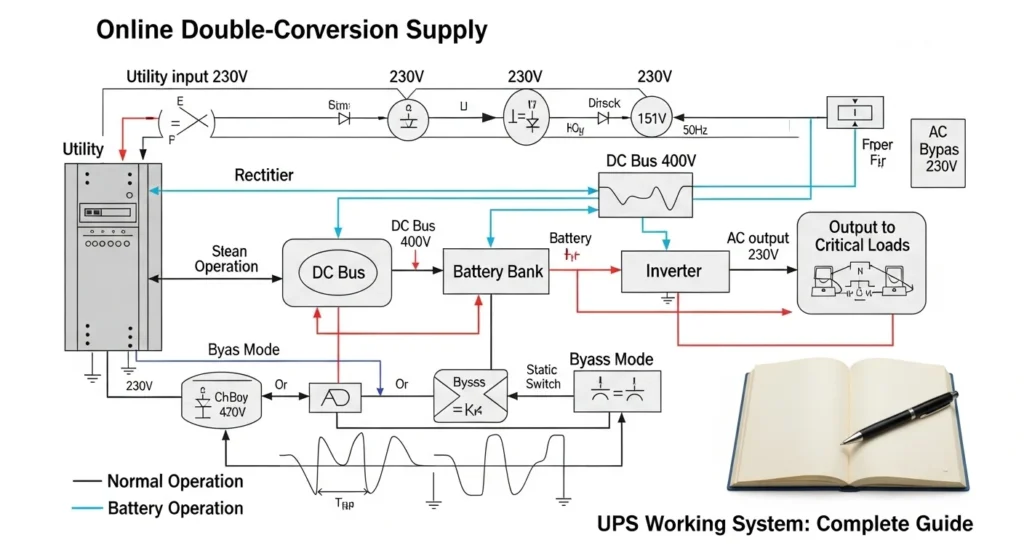
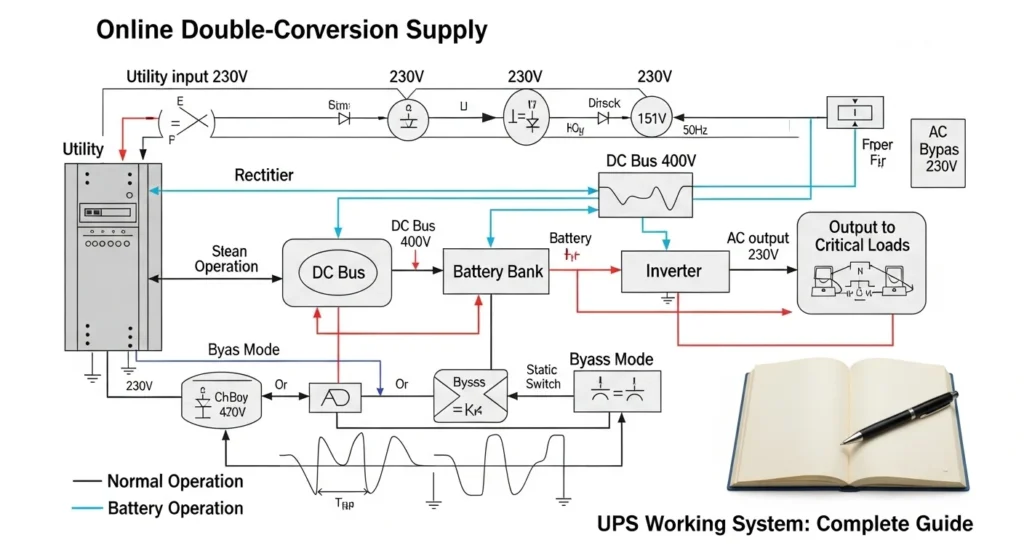
An Online UPS, also known as a Double Conversion UPS, is the most advanced and reliable type of Uninterruptible Power Supply used for critical electrical and electronic equipment. It provides continuous and clean power without any transfer delay during power failures. In an Online UPS system, the incoming AC power is first converted into DC power through a rectifier. This DC power charges the battery and simultaneously supplies the inverter. The inverter then converts the DC power back into stable AC power for the connected devices. Because the load always receives power from the inverter, there is no switching time when the main supply fails. This process is called double conversion and ensures a constant, uninterrupted power supply. Online UPS systems are commonly used in hospitals, data centers, communication systems, banks, laboratories, industrial plants, and other environments where even a small interruption in power can cause serious problems or data loss. One of the major advantages of an Online UPS is its excellent protection against voltage fluctuations, surges, spikes, frequency variations, and electrical noise. It delivers high-quality and stable output power regardless of the condition of the incoming supply. These UPS systems also provide better isolation between the utility power and sensitive equipment, increasing safety and reliability. However, Online UPS units are more expensive and consume more power than Offline and Line-Interactive UPS systems because the inverter operates continuously. Proper installation and maintenance are essential for efficient performance. The UPS should be installed in a cool, dust-free, and well-ventilated environment to prevent overheating. Regular battery testing, inspection of cooling fans, and monitoring of electrical connections help maintain long-term reliability. Users should also avoid overloading the UPS and ensure that the connected load remains within the rated capacity. Overall, an Online UPS is the best solution for critical applications that require maximum power protection, zero transfer time, and continuous operation during power disturbances or complete electrical failures.
- Always converts AC to DC and back to AC.
- No switching delay.
- Provides highest protection.
Used in:
- Hospitals
- Data centers
- Industrial systems
Understanding these types is important for UPS working system applications.
5. Main Components of UPS Working System
1. Rectifier
A rectifier is an electrical device or circuit that converts alternating current (AC) into direct current (DC). Since many electronic devices such as computers, mobile chargers, televisions, and battery charging systems require DC power for operation, rectifiers play an important role in electrical and electronic systems. A rectifier works by allowing current to flow in only one direction while blocking the opposite direction. Diodes are the main components used in rectifier circuits because they conduct electricity in a single direction. There are different types of rectifiers, including half-wave rectifiers, full-wave rectifiers, and bridge rectifiers. A half-wave rectifier uses only one half cycle of AC input, while a full-wave rectifier converts both halves of the AC cycle into DC output, making it more efficient. Rectifiers are widely used in power supplies, UPS systems, communication equipment, industrial machines, and renewable energy systems. They help provide stable DC power necessary for the proper functioning of modern electronic equipment.
- Converts AC to DC.
- Charges battery.
2. Battery
A battery is a device that stores chemical energy and converts it into electrical energy when needed. It is one of the most important sources of portable and backup power used in homes, industries, vehicles, and electronic devices. A battery consists of one or more electrochemical cells containing positive and negative terminals called electrodes, along with an electrolyte that allows the flow of ions. When the battery is connected to a circuit, a chemical reaction takes place, producing electric current. Batteries are mainly divided into two types: primary batteries and secondary batteries. Primary batteries are non-rechargeable and are used once, while secondary batteries are rechargeable and can be used multiple times. Common examples include dry cells, lead-acid batteries, and lithium-ion batteries. Batteries are widely used in UPS systems, mobile phones, laptops, solar systems, automobiles, and emergency lighting. Proper charging, maintenance, and safe handling are important to increase battery life and ensure reliable performance.
- Stores electrical energy.
- Supplies backup power.
3. Inverter
An inverter is an electrical device that converts direct current (DC) into alternating current (AC). It is widely used in power backup systems, solar energy systems, UPS units, and various electronic applications where AC power is required from a DC source such as a battery or solar panel. The inverter works by using electronic circuits and switching components to change the direction of current flow rapidly, producing an AC output waveform. Inverters are available in different types, including square wave, modified sine wave, and pure sine wave inverters. Pure sine wave inverters provide smooth and stable power suitable for sensitive electronic equipment. Inverters play an important role during power failures by supplying backup electricity to appliances and devices. They are commonly used in homes, offices, industries, and renewable energy systems. Proper installation, cooling, and maintenance are necessary for efficient operation and long service life. Overall, an inverter is an essential device for converting stored DC energy into usable AC electrical power.
- Converts DC to AC.
- Supplies power to load.
4. Static Switch
A static switch is an electronic switching device used in UPS systems and power control applications to transfer electrical load quickly and safely from one power source to another without mechanical movement. It uses semiconductor components such as thyristors, SCRs (Silicon Controlled Rectifiers), or triacs to perform fast switching operations. The main purpose of a static switch is to ensure continuous power supply to critical equipment during power failures, overloads, or faults. In a UPS system, the static switch automatically transfers the load between the main supply, inverter, and bypass source within milliseconds, preventing interruption of power to connected devices. Because it has no moving mechanical parts, a static switch operates silently, reliably, and with high speed. Static switches are commonly used in data centers, hospitals, communication systems, industrial plants, and sensitive electronic equipment where uninterrupted power is essential. Proper cooling and maintenance help improve efficiency, reliability, and long-term performance of the static switching system.
- Automatically switches between mains and battery.
5. Control Circuit
A control circuit is an electrical circuit designed to control the operation of machines, devices, and power systems. It manages functions such as starting, stopping, switching, protection, and automatic operation of electrical equipment. Control circuits usually operate with low voltage and low current compared to power circuits, making them safer and easier to handle. They consist of components such as switches, relays, contactors, timers, sensors, push buttons, and control transformers. In industrial and domestic applications, control circuits are widely used in motor control systems, automation systems, UPS units, elevators, air conditioners, and manufacturing machines. The control circuit sends signals to the main power circuit to perform specific tasks according to programmed conditions or user commands. Safety devices are also included to protect equipment from overloads, short circuits, and faults. Proper design, wiring, and maintenance of control circuits are essential for reliable performance, energy efficiency, and safe operation of electrical and electronic systems.
- Monitors voltage and system status.
- Ensures smooth operation.
6. Transformer
A transformer is an electrical device used to transfer electrical energy from one circuit to another through electromagnetic induction. It is mainly used to increase or decrease voltage levels in AC power systems. A transformer consists of two windings called the primary winding and secondary winding, wound around a magnetic core made of laminated iron. When alternating current flows through the primary winding, it creates a magnetic field that induces voltage in the secondary winding. If the secondary voltage is higher than the primary voltage, it is called a step-up transformer, and if it is lower, it is called a step-down transformer. Transformers are widely used in power generation, transmission, distribution systems, electronic devices, UPS systems, and industrial equipment. They help reduce power losses and ensure efficient transmission of electricity over long distances. Proper cooling, insulation, and maintenance are important for safe operation and long service life. Transformers are essential components of modern electrical power systems.
- Adjusts voltage level if required.
Each component works together in the UPS working system working principle.
6. UPS Working System Advantages and Disadvantages
Advantages
A UPS (Uninterruptible Power Supply) is an electrical device that provides emergency power to connected equipment when the main power source fails. It is widely used in homes, offices, hospitals, industries, and data centers to ensure continuous and stable electricity supply. The UPS works as a backup power system and also protects electrical devices from voltage fluctuations, surges, and power interruptions.
The working system of a UPS is based on a combination of a rectifier, battery bank, inverter, and control unit. When main AC power is available, the UPS converts AC into DC using a rectifier and stores it in the battery while also supplying power to connected devices. When a power failure occurs, the system instantly switches to battery power. The inverter then converts the stored DC power back into AC power, allowing connected devices to continue running without interruption. This switching happens in milliseconds, so there is no noticeable downtime for users.
There are mainly three types of UPS systems: offline UPS, line-interactive UPS, and online UPS. Offline UPS provides basic backup, line-interactive UPS offers voltage regulation, and online UPS delivers continuous, high-quality power by constantly supplying power through the inverter.
The advantages of a UPS system are very important in modern electrical environments. First, it provides uninterrupted power supply, which is essential for computers, servers, and medical equipment. Second, it protects devices from voltage fluctuations, spikes, and power surges that can damage sensitive electronics. Third, it ensures data safety by preventing sudden shutdowns, especially in offices and IT systems. Fourth, it improves productivity by reducing downtime caused by power failures. Fifth, UPS systems help extend the lifespan of electrical equipment by providing stable and clean power.
In addition, UPS systems are easy to install and require low maintenance compared to generators. They also operate silently, making them suitable for indoor environments. Overall, a UPS is a highly reliable power backup solution that ensures safety, stability, and continuous operation of electrical and electronic systems in both residential and commercial applications.
- Instant backup power
- Protects sensitive equipment
- Prevents data loss
- Voltage regulation
- Reduces downtime
- Safe and reliable
These UPS working system advantages and disadvantages should be evaluated before installation.
7. Disadvantages / Limitations
A UPS (Uninterruptible Power Supply) system is very useful for providing backup power and protecting electrical devices, but it also has some disadvantages that should be considered before installation and use. One of the main disadvantages of a UPS is its limited backup time. Most UPS systems can only provide power for a short duration, usually from a few minutes to a few hours depending on the battery capacity. This makes it suitable only for temporary backup, not long-term power supply.
Another disadvantage is the high initial cost, especially for advanced online UPS systems. A good quality UPS with a large capacity battery bank can be expensive, making it less affordable for small users or basic applications. In addition to the purchase cost, battery replacement is also costly because UPS batteries lose their efficiency over time and need to be replaced every few years.
Maintenance is another important concern. UPS systems require regular battery checks, proper ventilation, and periodic servicing to ensure smooth performance. If maintenance is ignored, the system may fail during power outages. Heat generation is also a problem because UPS units produce heat during operation, which can reduce battery life if proper cooling is not provided.
Efficiency losses are another drawback. During power conversion from AC to DC and back to AC, some energy is lost in the form of heat, which reduces overall efficiency. In addition, UPS systems may produce noise, especially larger industrial units with cooling fans.
Battery dependency is also a limitation. Since UPS systems rely heavily on batteries, their performance decreases as batteries age or if they are not properly charged. Over time, this can lead to reduced backup time and reliability.
Overall, while UPS systems are very useful for providing emergency power and protecting equipment, they have limitations such as high cost, limited backup duration, maintenance requirements, and battery dependency. Understanding these disadvantages helps users choose the right UPS system according to their needs and applications.
- High initial cost (especially online UPS)
- Battery maintenance required
- Limited backup time
- Batteries need replacement
- Generates heat
Proper maintenance reduces these limitations.
8. UPS Working System Applications
UPS working system applications are widely used in many sectors.
Home Applications
- Personal computers
- Wi-Fi routers
- Home offices
Commercial Applications
- Banks
- Offices
- Retail systems
Industrial Applications
- Control panels
- Automation systems
- CNC machines
Medical Applications
- ICU equipment
- Operation theaters
IT and Data Centers
- Servers
- Networking devices
UPS is critical where power interruption cannot be tolerated.
9. Difference Between UPS and Inverter
Many beginners ask about the difference between UPS and inverter.
| Feature | UPS | Inverter |
| Switching Time | Very fast (milliseconds) | Slight delay |
| Main Use | Sensitive equipment | General backup |
| Output Quality | Stable | May vary |
| Cost | Higher | Lower |
| Protection Level | High | Moderate |
UPS is mainly used for computers and critical systems, while inverter is used for lights and fans.
10. Selection Guide
Choosing the correct UPS working system depends on several factors.
1. Load Calculation
- Add total wattage of equipment.
- Choose UPS with 20–30% extra capacity.
2. Backup Time
- Decide required runtime (10 minutes, 30 minutes, 1 hour).
3. Type of UPS
- Home PC → Offline UPS
- Server room → Online UPS
4. Battery Type
- Lead-acid
- Lithium-ion
Tips for Beginners
- Never overload UPS
- Ensure proper ventilation
- Use earthing
- Regularly test battery
Proper selection ensures reliability.
11. Common Problems & Solutions
Q1: UPS not turning ON?
If a UPS is not turning ON, it usually indicates a problem in power supply, battery, or internal components. The first thing to check is the main input power. Make sure the UPS is properly connected to the AC supply and the socket is working. If there is no mains power or a loose connection, the UPS will not start.
Another common reason is a completely discharged or faulty battery. If the battery voltage is too low or the battery is damaged, the UPS may not switch ON. In this case, the battery may need charging or replacement. You can also check if the battery terminals are properly connected.
A blown internal fuse or tripped circuit breaker can also prevent the UPS from turning ON. Many UPS systems have a safety fuse that protects the unit from overload or short circuits. If it is damaged, it must be replaced.
Sometimes the UPS may not turn ON due to overload or connected devices drawing too much power. Disconnect all loads and try starting the UPS again.
If all these checks fail, the problem may be inside the UPS circuitry, such as the inverter, control board, or power components. In this case, professional repair is recommended.
Overall, checking power supply, battery condition, and fuses usually solves most UPS startup problems.
Cause:
- Dead battery
- Blown fuse
Solution:
- Replace battery
- Check fuse
Q2: Short backup time?
Short backup time in UPS (Uninterruptible Power Supply) means that the UPS is providing power for a very limited duration after a power failure, usually only a few minutes instead of the expected time.
This problem can happen due to several reasons. The most common reason is a weak or old battery. UPS batteries lose their capacity over time, so they cannot store enough energy to provide long backup. Another reason is overloading, where too many devices are connected to the UPS, causing the battery to drain quickly.
Sometimes, improper charging also leads to short backup time. If the UPS is not fully charging the battery due to faulty charging circuits or unstable input power, the backup time becomes very low. High power-consuming devices connected to the UPS can also reduce backup duration significantly.
Environmental conditions also affect performance. High temperature can reduce battery efficiency and lifespan, leading to shorter backup time. In some cases, incorrect battery type or low-quality replacement batteries can also cause this issue.
To fix short backup time, users should check the battery condition, reduce load, ensure proper charging, and replace old batteries if needed. Regular maintenance of the UPS system helps improve performance and backup duration.
Overall, short backup time is mainly related to battery health and load management, and proper care can significantly improve UPS performance.
Cause:
- Weak battery
- Overload
Solution:
- Replace battery
- Reduce load
Q3: Beeping sound continuously?
A continuous beeping sound in a UPS (Uninterruptible Power Supply) usually indicates that something is wrong or the UPS is operating in a warning or emergency mode. This sound is a built-in alarm system designed to alert the user about power or hardware issues.
One of the most common reasons is a power failure or low input voltage. When the main electricity supply is absent or unstable, the UPS switches to battery mode and starts beeping continuously to inform that it is running on backup power. Another major reason is a low battery condition. If the battery charge is very low, the UPS gives a continuous alarm to warn that backup power will end soon.
Overload is another important cause. If too many devices are connected to the UPS and they are consuming more power than its capacity, the system will beep continuously to indicate overload and risk of shutdown. In such cases, removing some devices can stop the alarm.
A faulty or weak battery can also trigger continuous beeping. Old batteries cannot hold charge properly, causing the UPS to signal an error. Similarly, internal faults such as inverter failure, overheating, or damaged circuits may also produce a continuous alarm sound.
Sometimes, the UPS may beep if it is in fault or protection mode, meaning it has detected a serious issue and is protecting itself and connected devices from damage.
To fix the problem, first check the power supply, then reduce connected load, and ensure the battery is properly charged. If the issue continues, the battery may need replacement or the UPS may require professional servicing.
Overall, continuous beeping in a UPS is an important warning signal that should not be ignored, as it indicates power, battery, or system-related problems.
Cause:
- Low battery
- Overheating
Solution:
- Allow charging
- Improve ventilation
Q4: UPS overheating?
UPS overheating is a common problem in uninterruptible power supply systems and it usually indicates that the unit is working under stress or facing internal or external issues. Overheating can reduce the efficiency of the UPS, damage the battery, and even lead to complete system failure if not controlled in time.
One of the main reasons for UPS overheating is overloading. When too many devices are connected to the UPS, it has to supply more power than its rated capacity. This increases internal heat generation in components like the inverter, transformer, and battery. Another major cause is poor ventilation. If the UPS is placed in a closed or hot environment without proper airflow, heat gets trapped and the system temperature rises quickly.
Continuous usage on battery mode can also cause overheating. When there is frequent power failure, the UPS keeps switching to battery and inverter operation, which produces more heat than normal standby operation. Similarly, dust accumulation inside the UPS can block cooling fans and air vents, reducing heat dissipation and increasing internal temperature.
A weak or aging battery may also contribute to overheating because it struggles to charge and discharge efficiently, causing extra load on the system. In some cases, faulty cooling fans or damaged internal components such as capacitors or transformers can lead to excessive heating.
To prevent UPS overheating, users should ensure proper load management, avoid overloading, and keep the UPS in a cool and ventilated area. Regular cleaning of dust and checking cooling fans is also important. Replacing old batteries and servicing the UPS periodically helps maintain safe temperature levels.
Overall, UPS overheating is a serious issue that should be addressed quickly to ensure safety, improve performance, and extend the lifespan of the system.
Cause:
- Poor airflow
- Internal fault
Solution:
- Keep in open space
- Check cooling fan
Regular inspection improves system life.
12. Future Trends
UPS technology is evolving rapidly.
New Developments
- Lithium-ion battery UPS
- Smart monitoring systems
- IoT-based remote control
- Modular UPS systems
- Energy-efficient designs
Modern UPS systems are becoming smaller, smarter, and more efficient.
In future, UPS will play a major role in renewable energy and smart grid systems.
13. Conclusion
UPS working system is one of the most important backup power technologies in modern electrical systems. It ensures uninterrupted power during outages and protects sensitive equipment from voltage fluctuations.
We discussed UPS working system working principle, types, components, UPS working system applications, and UPS working system advantages and disadvantages. We also explained the difference between UPS and inverter to clear common confusion.
As an electrical student or technician, understanding UPS systems will strengthen your practical knowledge and improve your troubleshooting skills. Focus on correct selection, proper installation, and regular maintenance.
Reliable power means reliable performance.