
You are working on an important project on your computer. Suddenly, the main power supply fails. The screen goes black, unsaved data is lost, and your system shuts down instantly. In hospitals, this kind of power failure can stop life-saving equipment. In data centers, it can cause huge financial loss.
This is where a UPS working system becomes critical.
UPS stands for Uninterruptible Power Supply. It provides instant backup power when the main supply fails. Unlike generators, a UPS reacts within milliseconds, so there is no interruption.
For electrical students, engineers, and technicians, understanding the UPS working system is essential. It is widely used in homes, offices, industries, hospitals, and IT infrastructure.
In this detailed guide, you will learn:
- What is UPS working system
- UPS working system working principle
- Types of UPS
- Components and their functions
- UPS working system applications
- UPS working system advantages and disadvantages
- Difference between UPS and inverter
- Selection tips and troubleshooting
Let’s understand it step by step.
2. What Is UPS Working System?
A UPS working system is an electrical device that provides emergency power to a load when the main input power source fails.
In simple words:
A UPS is a backup power system that gives instant electricity during power cuts.
Practical Example
Think of a computer system. If power fails:
- Without UPS → Computer shuts down immediately.
- With UPS → Computer keeps running for several minutes.
This allows the user to save data and safely shut down.
So, UPS working system means continuous and uninterrupted power supply for critical equipment.
3. UPS Working System Working Principle
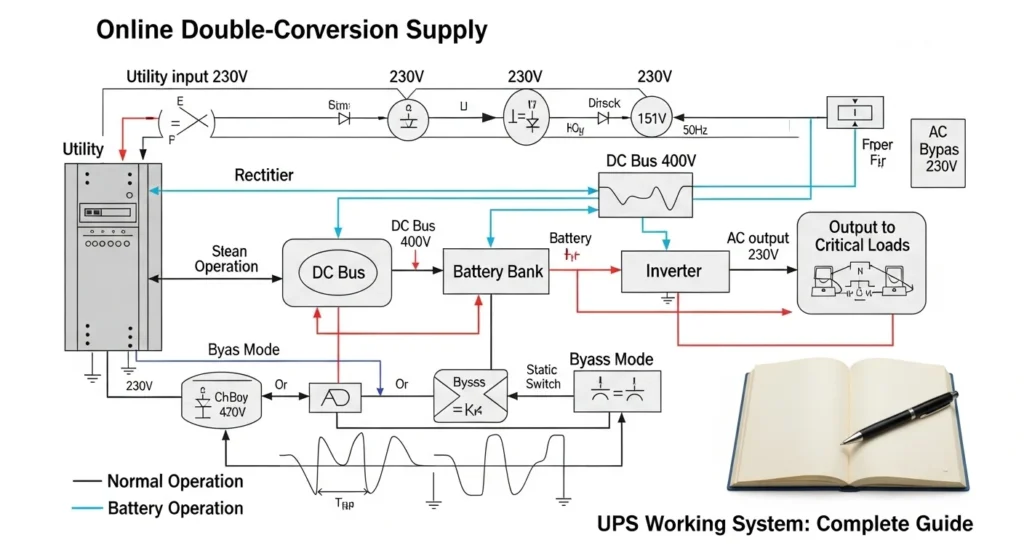
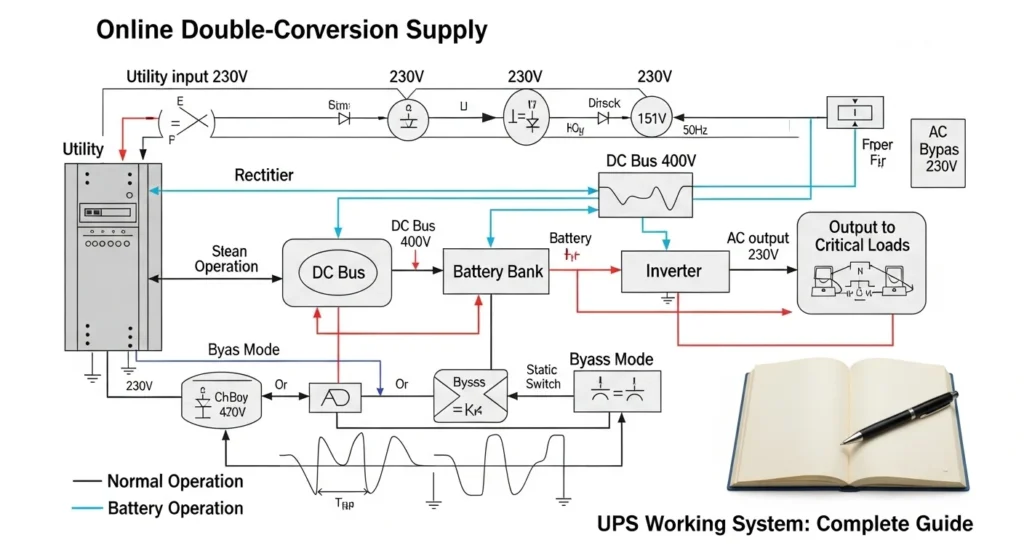
To understand UPS working system working principle, we must see how it behaves in two conditions:
- Normal mode
- Power failure mode
Step-by-Step Working
1. Normal Condition (Main Supply Available)
- AC input comes from mains.
- UPS passes power to load.
- At the same time, battery is charging.
2. Power Failure Condition
- Mains supply stops.
- Battery instantly supplies DC power.
- Inverter section converts DC to AC.
- Load continues working without interruption.
3. When Power Returns
- UPS switches back to mains.
- Battery starts charging again.
Simple Analogy
Think of UPS like a water tank with automatic switching:
- Main water supply = utility power
- Tank = battery
- Pump = inverter
If main supply stops, tank water flows automatically.
That is the core UPS working system working principle.
4. Types / Classification of UPS
UPS systems are mainly classified into three types.
Offline UPS (Standby UPS)
- Simplest type.
- Normally supplies power directly from mains.
- Switches to battery during power failure.
Advantages:
- Low cost
- Suitable for home PCs
Disadvantage:
- Small switching delay
Line-Interactive UPS
- Has automatic voltage regulation.
- Corrects minor voltage fluctuations.
- Switches to battery when needed.
Used in:
- Offices
- Small servers
Online UPS (Double Conversion UPS)
- Always converts AC to DC and back to AC.
- No switching delay.
- Provides highest protection.
Used in:
- Hospitals
- Data centers
- Industrial systems
Understanding these types is important for UPS working system applications.
5. Main Components of UPS Working System
1. Rectifier
- Converts AC to DC.
- Charges battery.
2. Battery
- Stores electrical energy.
- Supplies backup power.
3. Inverter
- Converts DC to AC.
- Supplies power to load.
4. Static Switch
- Automatically switches between mains and battery.
5. Control Circuit
- Monitors voltage and system status.
- Ensures smooth operation.
6. Transformer
- Adjusts voltage level if required.
Each component works together in the UPS working system working principle.
6. UPS Working System Advantages and Disadvantages
Advantages
- Instant backup power
- Protects sensitive equipment
- Prevents data loss
- Voltage regulation
- Reduces downtime
- Safe and reliable
These UPS working system advantages and disadvantages should be evaluated before installation.
7. Disadvantages / Limitations
- High initial cost (especially online UPS)
- Battery maintenance required
- Limited backup time
- Batteries need replacement
- Generates heat
Proper maintenance reduces these limitations.
8. UPS Working System Applications
UPS working system applications are widely used in many sectors.
Home Applications
- Personal computers
- Wi-Fi routers
- Home offices
Commercial Applications
- Banks
- Offices
- Retail systems
Industrial Applications
- Control panels
- Automation systems
- CNC machines
Medical Applications
- ICU equipment
- Operation theaters
IT and Data Centers
- Servers
- Networking devices
UPS is critical where power interruption cannot be tolerated.
9. Difference Between UPS and Inverter
Many beginners ask about the difference between UPS and inverter.
| Feature | UPS | Inverter |
| Switching Time | Very fast (milliseconds) | Slight delay |
| Main Use | Sensitive equipment | General backup |
| Output Quality | Stable | May vary |
| Cost | Higher | Lower |
| Protection Level | High | Moderate |
UPS is mainly used for computers and critical systems, while inverter is used for lights and fans.
10. Selection Guide
Choosing the correct UPS working system depends on several factors.
1. Load Calculation
- Add total wattage of equipment.
- Choose UPS with 20–30% extra capacity.
2. Backup Time
- Decide required runtime (10 minutes, 30 minutes, 1 hour).
3. Type of UPS
- Home PC → Offline UPS
- Server room → Online UPS
4. Battery Type
- Lead-acid
- Lithium-ion
Tips for Beginners
- Never overload UPS
- Ensure proper ventilation
- Use earthing
- Regularly test battery
Proper selection ensures reliability.
11. Common Problems & Solutions
Q1: UPS not turning ON?
Cause:
- Dead battery
- Blown fuse
Solution:
- Replace battery
- Check fuse
Q2: Short backup time?
Cause:
- Weak battery
- Overload
Solution:
- Replace battery
- Reduce load
Q3: Beeping sound continuously?
Cause:
- Low battery
- Overheating
Solution:
- Allow charging
- Improve ventilation
Q4: UPS overheating?
Cause:
- Poor airflow
- Internal fault
Solution:
- Keep in open space
- Check cooling fan
Regular inspection improves system life.
12. Future Trends
UPS technology is evolving rapidly.
New Developments
- Lithium-ion battery UPS
- Smart monitoring systems
- IoT-based remote control
- Modular UPS systems
- Energy-efficient designs
Modern UPS systems are becoming smaller, smarter, and more efficient.
In future, UPS will play a major role in renewable energy and smart grid systems.
13. Conclusion
UPS working system is one of the most important backup power technologies in modern electrical systems. It ensures uninterrupted power during outages and protects sensitive equipment from voltage fluctuations.
We discussed UPS working system working principle, types, components, UPS working system applications, and UPS working system advantages and disadvantages. We also explained the difference between UPS and inverter to clear common confusion.
As an electrical student or technician, understanding UPS systems will strengthen your practical knowledge and improve your troubleshooting skills. Focus on correct selection, proper installation, and regular maintenance.
Reliable power means reliable performance.