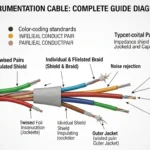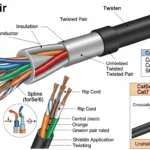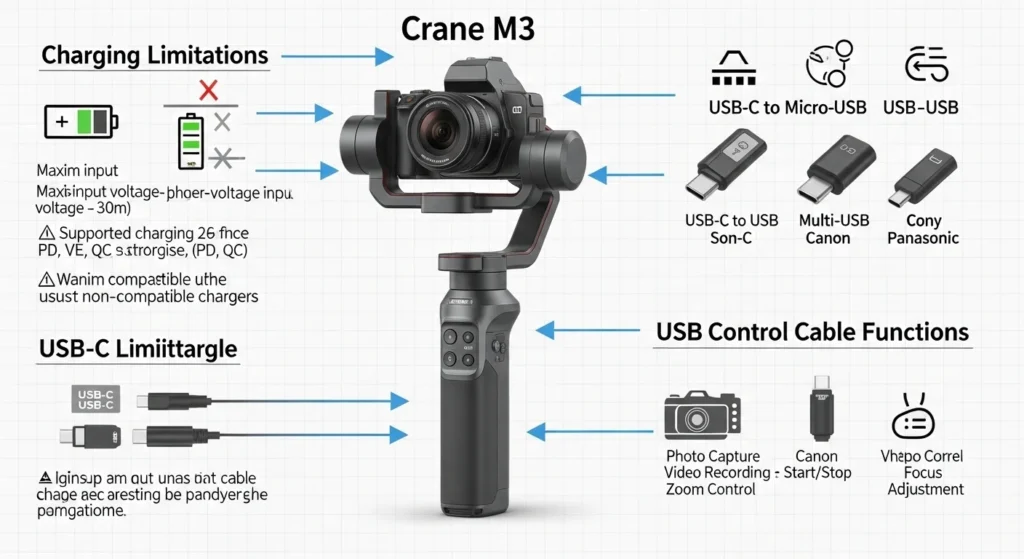

Imagine a videographer preparing for an important outdoor shoot. The camera battery is ready, the lighting is perfect, and the stabilizer is mounted. But suddenly, the stabilizer stops working because it was not charged properly through its USB control cable. This situation happens more often than many beginners realize, especially when using devices like the Crane M3 gimbal.
The Crane M3 USB control cable charging limitations are an important topic for electrical students, engineers, technicians, and beginners who work with modern electronic devices. Many people assume that any USB cable can charge and control a device at the same time, but this is not always true. USB cables have different functions, power limits, and communication capabilities.
Understanding these limitations helps users avoid equipment damage, slow charging, connection failures, and power inefficiencies. It also improves device reliability during professional work.
In this article, we will explain the Crane M3 USB control cable charging limitations, its working principle, types of USB cables, components involved, advantages and disadvantages, applications, and troubleshooting methods. By the end, you will clearly understand how USB control cables work and how to choose the correct one for stable performance.
2. What Are Crane M3 USB Control Cable Charging Limitations?
The Crane M3 USB control cable charging limitations refer to the restrictions and technical boundaries associated with using a USB control cable with the Zhiyun Crane M3 gimbal. These limitations mainly involve how the cable handles power delivery, data transmission, and device communication. Although many users assume that a USB cable can perform all functions equally well, this is not always true. Some cables are specifically designed for control and communication purposes rather than providing sufficient electrical power for charging.
In simple terms, the USB control cable used with the Crane M3 is primarily intended to establish a connection between the gimbal and compatible devices such as cameras. Through this connection, users can operate certain camera functions directly from the gimbal controls. However, the same cable may not support high-current charging required to efficiently charge the gimbal’s battery or other connected devices.
Simple Explanation
A USB cable can generally perform three important functions:
- Transfer Electrical Power: Supplies electricity to charge batteries or power devices.
- Transfer Data Signals: Allows the exchange of digital information between connected devices.
- Control Connected Devices: Enables one device to send operational commands to another.
The limitation occurs because not all USB cables are built with the same specifications. Some are optimized mainly for data communication and control signals, which means they contain wiring and components designed to prioritize stable communication rather than high-power delivery. As a result, they may only support low charging currents.
Practical Example
Consider a situation where a user connects a Zhiyun Crane M3 gimbal to a camera using the supplied USB control cable.
In this setup:
- The gimbal communicates with the camera through the cable.
- The user can start or stop video recording using the buttons located on the gimbal handle.
- Camera functions such as shutter control may operate correctly.
- However, the cable may not provide enough power to charge the Crane M3 battery efficiently while these control functions are active.
For example, if the gimbal requires a higher charging current for fast charging, but the control cable only supports a lower current output, the battery may charge very slowly or may not charge at all during operation.
Reasons Behind These Limitations
Several technical factors contribute to Crane M3 USB control cable charging limitations:
- Limited Current Capacity: The cable may only support low-amperage power transmission.
- Focus on Data Stability: The cable is engineered primarily for reliable communication between the camera and gimbal.
- Device Compatibility Restrictions: Different camera models have different USB communication protocols and power requirements.
- Lack of Fast-Charging Support: Some control cables do not support advanced charging technologies such as USB Power Delivery (USB-PD) or Quick Charge.
- Safety Considerations: Restricting charging power helps prevent overheating, battery damage, and communication failures.
How to Avoid Charging Issues
Users can reduce these limitations by following a few practical guidelines:
- Use the original USB control cable recommended by Zhiyun.
- Charge the Crane M3 separately using its designated charging port and compatible charger.
- Avoid assuming that every USB cable supports both high-speed charging and device control.
- Check the specifications of both the camera and the gimbal before connecting them.
- Use certified cables that meet the required power and data standards.
The Crane M3 USB control cable charging limitations highlight the difference between a cable designed for communication and one designed for high-power charging. While the control cable allows users to operate cameras through the gimbal and transfer data effectively, it may not always deliver sufficient power to charge the Crane M3 battery at the desired speed. Understanding these limitations helps users choose the correct accessories, avoid charging problems, and ensure reliable performance from both their gimbal and connected devices.
3. Crane M3 USB Control Cable Working Principle
The Crane M3 USB control cable working principle is based on the combined functions of power transmission, data communication, and device control. The USB control cable acts as a bridge between the Zhiyun Crane M3 gimbal and connected devices, such as cameras, allowing them to exchange information and perform specific functions. At the same time, the cable may also transfer electrical power, although the amount of power delivered depends on the cable’s design and technical specifications.
In simple terms, the USB control cable can be compared to a two-lane road. One lane is responsible for carrying electrical energy, while the other lane carries digital instructions and communication signals between devices. These two functions work together to provide a seamless user experience.
Think of the USB Cable Like a Two-Lane Road
- One lane carries electricity (power) to supply energy to connected devices or support charging.
- The other lane carries information (data signals) that allow devices to communicate and exchange commands.
Because both tasks occur simultaneously, the cable enables the gimbal to control camera functions while maintaining communication between the connected equipment.
Step-by-Step Working Process
1. Power Source Connection
The working process begins when the USB control cable is connected between the Crane M3 gimbal and another device, such as a compatible camera or a power source. This physical connection establishes the pathway required for both electrical and data transmission.
Once connected, the devices recognize each other and prepare for communication based on supported protocols.
👉 Without this initial connection, neither charging nor device control can take place.
2. Voltage Supply
After the connection is established, the USB cable provides a standard voltage supply, which is typically around 5 volts DC (Direct Current) in conventional USB systems.
This voltage serves two main purposes:
- Supporting communication circuitry.
- Providing electrical power when charging functions are available.
The actual voltage may vary slightly depending on the USB standard being used, but most USB control cables operate within safe low-voltage limits.
👉 The supplied voltage acts as the driving force that enables the cable to perform its functions.
3. Current Flow
The cable then allows electric current to flow through its power conductors. However, the amount of current delivered depends on several factors, including:
- Cable construction quality.
- Wire thickness.
- USB specifications.
- Device compatibility.
Some USB control cables are designed to handle only a limited amount of current because their primary purpose is device communication rather than charging.
For example:
- Low-current cables may only support communication functions.
- Higher-rated cables may support both communication and charging.
👉 Current flow determines whether the connected device can charge effectively or only maintain communication.
4. Data Communication
Inside the USB control cable are dedicated data wires that transfer digital information between the Crane M3 gimbal and the connected camera.
These data signals allow the devices to exchange instructions and status information.
Data communication enables functions such as:
- Device recognition.
- Camera synchronization.
- Command transmission.
- Status feedback.
The communication process occurs almost instantly and continuously while the devices remain connected.
👉 Stable data transfer is essential for reliable control performance.
5. Device Control
One of the most useful features of the Crane M3 USB control cable is its ability to support camera control functions directly from the gimbal.
Once communication has been established, the gimbal can send commands to the connected camera, including:
- Starting video recording.
- Stopping video recording.
- Triggering the camera shutter.
- Activating supported shooting modes.
- Executing other compatible camera functions.
This allows users to operate the camera without touching it physically, improving efficiency during filming.
👉 Device control enhances convenience and enables smoother professional workflows.
6. Charging Attempt
The final stage involves charging capability. When the cable supports sufficient current capacity, electrical power can be used to charge the connected device.
However, charging performance depends on:
- The cable’s current rating.
- Power source capability.
- Camera compatibility.
- Gimbal charging requirements.
If the cable is primarily designed for communication purposes, it may not provide enough current for effective charging.
As a result:
- Charging may occur slowly.
- Charging may be intermittent.
- Charging may not occur at all.
👉 This is why users sometimes notice that the Crane M3 communicates perfectly with the camera but does not charge efficiently.
Important Point
Many Crane M3 USB control cables prioritize stable communication over high charging power. Manufacturers often design these cables to ensure reliable transmission of control signals rather than maximum energy delivery.
Because of this design approach:
- Device control functions work smoothly.
- Data communication remains stable.
- Charging capability may be limited.
- Fast charging is often unavailable.
Understanding this limitation helps users avoid confusion and select the correct cable for their intended purpose.
Working Principle Summary
The working principle of the Crane M3 USB control cable can be summarized as follows:
- The USB cable connects the Crane M3 gimbal to a camera or power source.
- A standard low-voltage power supply is established.
- Electrical current flows according to the cable’s design limitations.
- Internal data wires transmit communication signals.
- The gimbal sends operational commands to the camera.
- Charging occurs only if the cable and connected devices support adequate power delivery.
The Crane M3 USB control cable working principle combines three essential functions: power transmission, data communication, and device control. While the cable enables seamless interaction between the Crane M3 gimbal and compatible cameras, its charging capability depends largely on its current-handling capacity and intended design. Since many control cables are optimized for communication rather than high-power charging, users should understand these limitations to achieve the best performance from their equipment. By using appropriate cables and compatible devices, filmmakers and content creators can enjoy reliable camera control while avoiding unexpected charging issues.
4. Types / Classification
Different USB cables affect the Crane M3 USB control cable charging limitations.
USB Type-C Control Cable
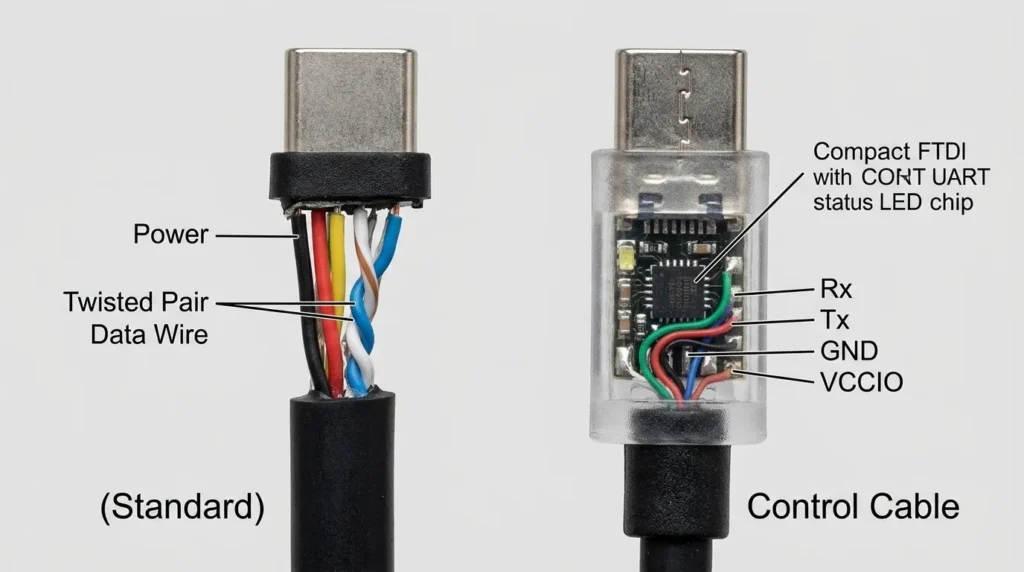
USB Type-C Control Cable is a modern and versatile cable used for power delivery, data transmission, and device control in a wide range of electronic equipment. It features a compact, reversible connector design that can be inserted into a device in either orientation, making it more convenient and user-friendly than older USB standards. USB Type-C control cables are commonly used with smartphones, cameras, gimbals, laptops, tablets, gaming devices, and other smart electronics because they support multiple functions through a single connection. One of the main advantages of a USB Type-C control cable is its ability to transfer data at high speeds while simultaneously delivering electrical power. Depending on its specifications, the cable can support fast charging technologies and advanced communication protocols that allow connected devices to exchange commands and operational information efficiently. In devices such as camera gimbals, including models like the Zhiyun Crane M3, a USB Type-C control cable enables the gimbal to communicate directly with compatible cameras. Through this connection, users can perform functions such as starting or stopping video recording, triggering the camera shutter, and controlling certain camera settings without physically touching the camera. The cable contains dedicated conductors for both power transmission and digital data signals, ensuring stable communication between connected devices. However, not all USB Type-C control cables offer the same capabilities. Some are optimized mainly for data communication and control functions, while others support high-power charging through technologies such as USB Power Delivery (USB-PD). Therefore, selecting a high-quality and compatible cable is essential to achieve reliable performance and avoid charging limitations. USB Type-C control cables are also valued for their durability, compact size, and compatibility with modern electronic standards. As technology continues to evolve, these cables are becoming increasingly important in professional photography, videography, and everyday electronic applications because they provide a simple, efficient, and multifunctional solution for connecting and controlling devices while supporting power and data transfer through a single cable.
USB Type-C cables are modern and support:
- Faster charging
- Higher data speed
- Reversible connection
However, some Type-C cables are data-only cables, which limits charging performance.
Micro-USB Control Cable
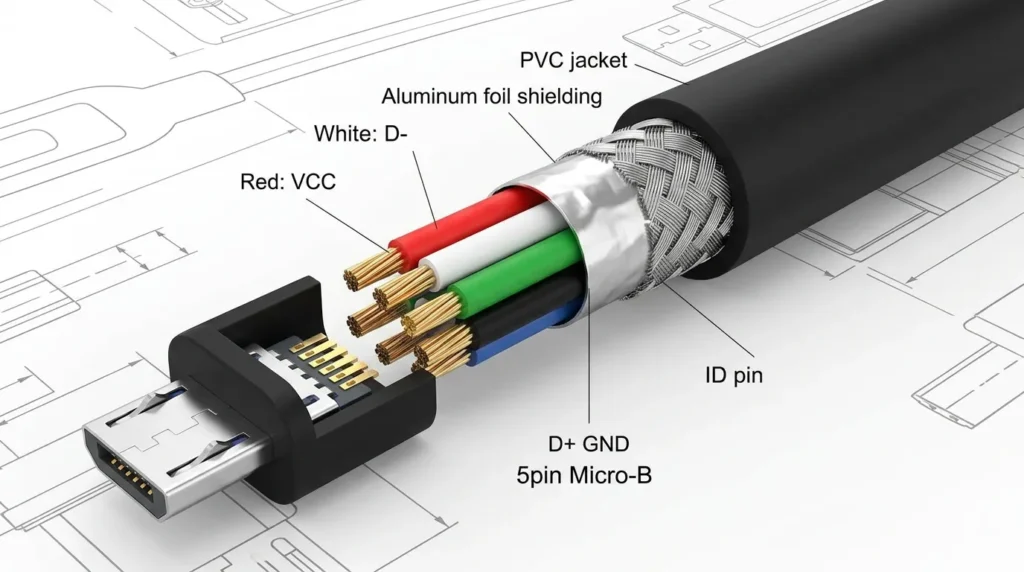
Micro-USB Control Cable is a widely used cable designed for power transfer, data communication, and device control in various electronic devices. Before the widespread adoption of USB Type-C technology, Micro-USB cables were the standard connection method for smartphones, digital cameras, power banks, Bluetooth speakers, gimbals, and many other portable devices. The cable features a small and compact connector that fits into Micro-USB ports and allows devices to exchange information while also receiving electrical power. In control applications, a Micro-USB control cable enables communication between two compatible devices, allowing one device to send commands to another. For example, when used with camera gimbals, the cable allows the gimbal to control camera functions such as starting and stopping video recording, capturing photos, and operating certain settings directly through the gimbal’s buttons. The cable contains separate conductors for transmitting power and digital data signals, ensuring that communication remains stable during operation. Standard Micro-USB cables typically provide a voltage supply of approximately 5 volts DC, while the amount of current they can carry depends on their design and quality. Some Micro-USB control cables are optimized mainly for data transfer and device control, meaning they may support only limited charging capability. As a result, they might not provide sufficient power for fast charging or for operating high-power devices. Despite these limitations, Micro-USB control cables remain popular because they are affordable, lightweight, and widely compatible with older electronic equipment. They are easy to carry and are available in different lengths and specifications to meet various user needs. However, unlike USB Type-C connectors, Micro-USB connectors are not reversible and must be inserted in the correct orientation. Although many modern devices have transitioned to newer connection standards, Micro-USB control cables continue to play an important role in photography, videography, and consumer electronics by providing a reliable method for device communication, control functions, and basic charging capabilities.
Older devices use Micro-USB cables.
Characteristics:
- Lower power capacity
- Slower charging speed
- Limited data transfer
These cables commonly show charging limitations.
USB Charging Cable
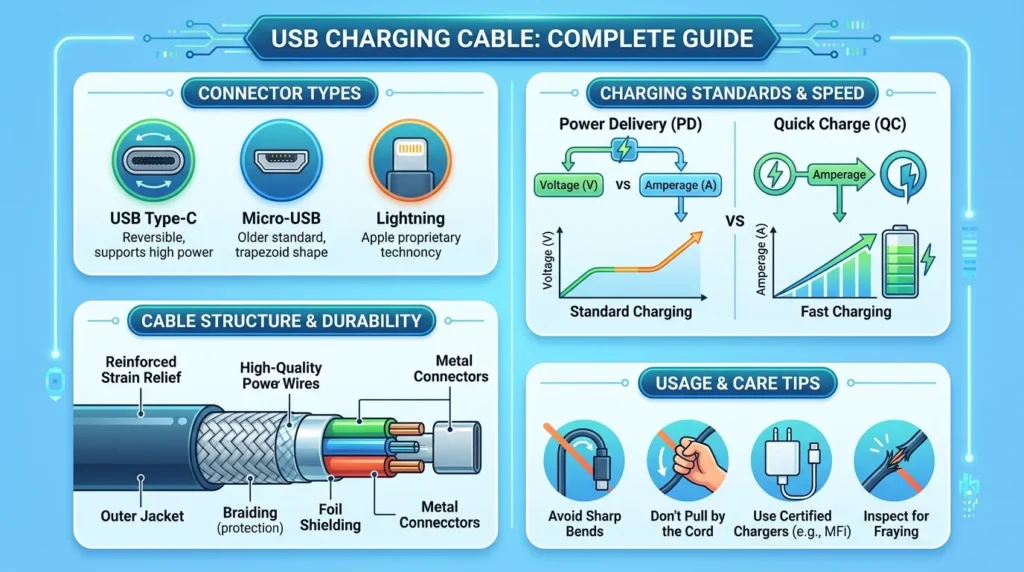
USB Charging Cable is an essential accessory used to transfer electrical power from a power source to electronic devices for charging their batteries. It is one of the most commonly used cables in modern technology and is found in homes, offices, schools, and workplaces around the world. USB charging cables are designed to connect devices such as smartphones, tablets, cameras, power banks, wireless earphones, gaming controllers, gimbals, and many other portable electronics to chargers, computers, or USB power adapters. The primary function of a USB charging cable is to deliver electrical energy safely and efficiently so that the connected device can recharge its battery and continue operating properly.
A typical USB charging cable consists of internal copper conductors covered with protective insulation and an outer jacket that provides durability and flexibility. One end of the cable usually connects to a power source, while the other end connects to the device being charged. Depending on the type of connector, USB charging cables are available in several formats, including USB Type-A to Micro-USB, USB Type-A to USB Type-C, USB Type-C to USB Type-C, and USB Type-A to Lightning cables. Modern USB charging cables can support advanced charging technologies such as USB Power Delivery (USB-PD) and Quick Charge, allowing compatible devices to charge much faster than traditional USB connections. The charging speed depends on factors such as the cable quality, wire thickness, charger output, and the device’s charging capability.
Some USB charging cables are designed only for power transmission, while others also support data transfer between devices. High-quality cables provide stable voltage, efficient current flow, and protection against overheating and electrical damage. Choosing certified and durable cables helps prevent charging problems and extends the lifespan of electronic devices. As technology continues to evolve, USB charging cables remain an indispensable part of everyday life, providing a convenient, reliable, and efficient solution for keeping modern electronic devices powered and ready for use whenever needed.
These cables are designed mainly for:
- High current flow
- Fast charging
- Minimal data communication
They are better for charging but may not support device control.
USB Data Cable
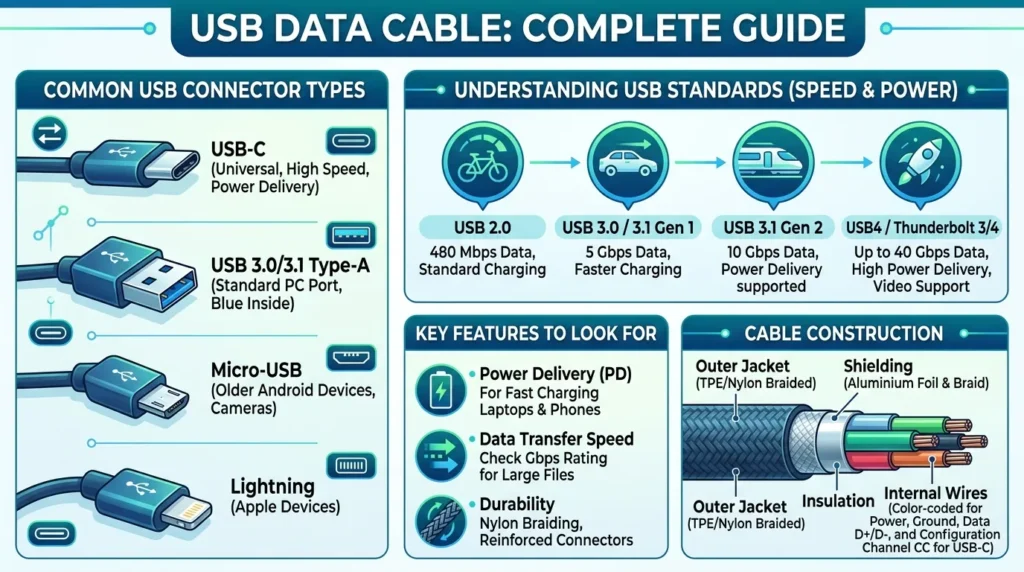
USB Data Cable is a specialized cable used to transfer digital information between electronic devices while often providing power for charging at the same time. It serves as an essential link that enables devices to communicate, synchronize, and exchange data efficiently. USB data cables are commonly used with smartphones, tablets, computers, digital cameras, printers, external hard drives, gaming devices, and many other electronic products. Their primary purpose is to allow users to move files such as photos, videos, documents, music, and software from one device to another quickly and securely. Unlike cables designed only for charging, USB data cables contain dedicated conductors that support both power transmission and digital signal transfer.
Inside a USB data cable, there are usually multiple wires, including power lines and data lines. The power wires supply electrical energy to connected devices, while the data wires carry binary signals that enable communication between devices. When a smartphone is connected to a computer using a USB data cable, the computer can detect the phone, access its storage, transfer files, perform backups, or install software updates. In professional environments, these cables are also used for programming devices, updating firmware, connecting printers, and transferring information between specialized equipment. The speed of data transfer depends on the USB standard supported by the cable and devices involved. Older USB standards provide slower transfer rates, whereas modern versions such as USB 3.0, USB 3.1, and USB Type-C offer significantly faster performance and improved efficiency.
USB data cables are available in various connector types, including USB Type-A, Micro-USB, Mini-USB, Lightning, and USB Type-C, ensuring compatibility with a wide range of devices. High-quality cables feature strong insulation, durable connectors, and effective shielding to reduce signal interference and maintain stable communication. Although many USB data cables also support charging, their charging capability varies according to design specifications. Choosing a reliable and certified USB data cable helps ensure faster data transfer, secure connections, and longer service life. As digital technology continues to evolve, USB data cables remain indispensable tools for communication, file management, device synchronization, and everyday electronic connectivity.
Data cables focus on communication.
Features:
- Stable signal transmission
- Lower power capacity
- Control compatibility
These cables often create charging limitations.
5. Main Components of a Crane M3 USB Control Cable
Understanding the main components of a Crane M3 USB control cable is essential for explaining how the cable works and why certain charging limitations occur. Although the cable may appear simple from the outside, it contains several internal parts that work together to transfer electrical power, transmit data signals, and enable communication between the Zhiyun Crane M3 gimbal and connected devices such as cameras. The quality and design of these components directly affect charging performance, data stability, and overall reliability.
1. USB Connector
The USB connector is the visible end of the cable that plugs into the device. It serves as the physical interface between the Crane M3 gimbal, camera, charger, or computer. The connector establishes the electrical and communication pathway required for the cable to function properly.
Common connector types include:
- USB Type-C: A modern, reversible connector that supports fast data transfer and higher power delivery.
- Micro-USB: A compact connector widely used in older cameras and electronic devices.
- USB Type-A: The traditional rectangular USB connector commonly found on computers and power adapters.
The type of connector determines device compatibility and may also influence charging and communication capabilities.
👉 A properly matched connector ensures stable operation and prevents connection issues.
2. Power Wires
Inside the USB control cable are dedicated power wires that carry electrical energy from the power source to the connected device. These conductors deliver the voltage and current needed for charging or operating electronic circuits.
The charging capability of the cable depends greatly on these wires.
Factors affecting power transmission include:
- Thickness of the copper conductors
- Quality of the wire material
- Cable length
- Internal resistance
Thin wires increase resistance and reduce current-carrying capacity, which can lead to slower charging speeds or limited charging performance.
👉 This is one of the main reasons why some Crane M3 control cables support communication but provide limited charging power.
3. Data Wires
The data wires are responsible for transmitting digital information between the Crane M3 gimbal and connected devices. These wires carry control signals that allow the devices to communicate effectively.
Through the data wires, the gimbal can perform functions such as:
- Starting video recording
- Stopping video recording
- Triggering the camera shutter
- Synchronizing camera functions
- Exchanging status information
Stable data transmission is crucial because even minor signal interruptions can affect device control performance.
👉 Data wires transform the cable from a simple charging accessory into an intelligent communication tool.
4. Insulation Layer
Each internal conductor is covered with an insulation layer, which separates the wires electrically and protects them from accidental contact.
The insulation performs several important functions:
- Prevents short circuits between conductors
- Reduces the risk of electrical leakage
- Protects users from electric shock
- Maintains signal integrity
- Increases cable durability
Materials such as PVC, polyethylene, and other insulating compounds are commonly used because of their flexibility and excellent electrical resistance.
👉 Without proper insulation, both charging and data communication could become unsafe and unreliable.
5. Shielding Layer
High-quality Crane M3 USB control cables often include a shielding layer surrounding the internal conductors. This protective layer helps block unwanted electromagnetic interference (EMI) and radio-frequency interference (RFI).
Sources of interference may include:
- Mobile phones
- Wi-Fi routers
- Power adapters
- Other electronic devices
- Nearby electrical equipment
The shielding layer provides several benefits:
- Prevents signal disturbances
- Improves communication stability
- Reduces data errors
- Maintains reliable camera control
- Enhances overall cable performance
👉 Effective shielding ensures that digital commands between the gimbal and camera remain accurate, even in environments with significant electronic noise.
6. Advantages of Crane M3 USB Control Cable
Despite certain charging limitations, the Crane M3 USB control cable offers numerous advantages that make it an essential accessory for photographers, videographers, and content creators. It simplifies device connectivity, improves workflow efficiency, and allows users to control compatible cameras directly from the gimbal. By combining power transmission and data communication into a single cable, it reduces complexity and enhances the overall shooting experience.
Advantages Table
| No. | Advantage | Detailed Explanation |
|---|---|---|
| 1 | Easy Device Connection | The USB control cable provides a quick and straightforward way to connect the Crane M3 gimbal with compatible cameras and other devices without complicated setup procedures. |
| 2 | Allows Remote Camera Control | Users can start or stop video recording, capture photos, and control certain camera functions directly from the gimbal handle, reducing the need to touch the camera. |
| 3 | Supports Compact Equipment Setup | Since one cable can handle communication and limited power functions, it helps maintain a cleaner and more organized setup with fewer accessories. |
| 4 | Reduces the Need for Multiple Cables | Instead of using separate cables for communication and control, a single USB control cable can perform multiple tasks, making the setup simpler and more convenient. |
| 5 | Enables Synchronized Device Operation | The cable allows the gimbal and camera to work together efficiently, ensuring that control commands are executed instantly during filming. |
| 6 | Portable and Lightweight Design | USB control cables are compact, lightweight, and easy to carry, making them ideal for travel, outdoor shoots, and mobile production environments. |
| 7 | Compatible with Modern Electronic Devices | Many USB control cables support widely used connector types such as USB Type-C and Micro-USB, allowing compatibility with a broad range of cameras and accessories. |
| 8 | Improves Shooting Efficiency | Direct camera control through the gimbal helps users focus on framing and stabilization without interrupting the recording process. |
| 9 | Easy to Replace and Maintain | USB cables are widely available in the market and can be replaced easily if damaged or worn out. |
| 10 | Cost-Effective Solution | Compared to specialized wireless control systems, USB control cables provide an affordable method of achieving reliable communication and camera control. |
These advantages explain why USB control cables continue to play an important role in modern gimbal systems despite their charging restrictions.
7. Disadvantages / Limitations of Crane M3 USB Control Cable
Although the Crane M3 USB control cable offers many benefits, it also has certain limitations that users should understand before relying on it for both communication and charging purposes. Most of these drawbacks arise because many control cables are designed primarily for stable data transmission rather than high-power delivery.
Limited Charging Current Capacity
One of the biggest limitations is the cable’s restricted ability to carry electrical current. Many control cables use thinner conductors that are sufficient for communication but cannot support high charging currents. As a result, the cable may provide only minimal charging capability.
Slow Charging Speed
Because of limited current capacity, charging through the control cable can be significantly slower compared to dedicated charging cables. Users expecting fast charging may find the performance disappointing, especially during intensive shooting sessions.
Some Cables Support Only Data Transfer
Not every USB control cable supports both charging and communication. Certain cables are specifically designed for data transmission and device control. In such cases, the cable may establish camera communication perfectly while providing little or no charging function.
Compatibility Issues with Certain Cameras
Different camera manufacturers use varying communication protocols and requirements. A cable that works with one camera model may not support full functionality with another. This can lead to limited control features or connection failures.
Cable Quality Affects Performance
The overall performance of the cable depends heavily on its manufacturing quality. Poor-quality cables may suffer from unstable communication, reduced charging efficiency, weak connectors, and shorter service life.
Possible Overheating with Poor Cables
Low-quality cables that are not designed to handle the required electrical load may overheat during operation. Excessive heat can damage the cable, affect connected devices, and potentially create safety risks.
Power Loss Over Longer Cables
Longer USB cables generally have higher electrical resistance, which can reduce the amount of power reaching the connected device. This voltage drop may further slow charging speeds and decrease overall efficiency.
Limited Fast-Charging Support
Many Crane M3 control cables do not support advanced charging technologies such as USB Power Delivery (USB-PD) or Quick Charge. Consequently, users cannot take advantage of modern fast-charging capabilities.
Increased Dependence on Compatible Accessories
For optimal performance, users often need original or certified accessories recommended by the manufacturer. Using incompatible cables can result in unreliable operation or restricted functionality.
Wear and Tear from Frequent Use
Repeated plugging, unplugging, bending, and transportation can gradually weaken connectors and internal conductors. Over time, this wear may lead to intermittent connections or complete cable failure.
Understanding the advantages and disadvantages of the Crane M3 USB control cable helps users make informed decisions about its practical use. While the cable provides convenient camera control, compact setup, and dependable communication, it may also have limitations related to charging speed, current capacity, and compatibility. Choosing high-quality, certified cables and using dedicated charging accessories when necessary can help maximize performance and ensure a smooth shooting experience with the Crane M3 gimbal.
8. Applications of Crane M3 USB Control Cable
The applications of the Crane M3 USB control cable extend far beyond simple charging. While many people assume that a USB cable is only used to supply power, the Crane M3 USB control cable is primarily designed to enable device communication, remote control, and synchronized operation between the Zhiyun Crane M3 gimbal and other compatible electronic devices. Its ability to transmit both power and data makes it a valuable accessory in photography, filmmaking, content creation, and technical applications.
Photography and Videography
One of the most common applications of the Crane M3 USB control cable is in photography and videography. The cable allows photographers and videographers to connect their cameras directly to the gimbal, enabling control of certain camera functions without touching the camera itself.
Through this connection, users can perform tasks such as:
- Starting and stopping video recording.
- Capturing photographs remotely.
- Activating the camera shutter.
- Synchronizing camera functions with gimbal movements.
- Maintaining a smooth and uninterrupted shooting workflow.
This feature is especially useful when using the gimbal for moving shots, as it allows the operator to focus on stabilization and composition rather than manually operating the camera.
👉 The result is improved efficiency, greater creative freedom, and better-quality footage.
Professional Filmmaking
In professional filmmaking environments, coordination between equipment is essential. The Crane M3 USB control cable helps create a synchronized workflow by allowing the camera and gimbal to communicate seamlessly.
Its applications in filmmaking include:
- Triggering recording during complex camera movements.
- Reducing interruptions during production.
- Supporting consistent operation between devices.
- Improving efficiency during multi-shot sequences.
- Helping operators execute cinematic movements more effectively.
Professional filmmakers value this capability because it minimizes distractions and allows them to concentrate on capturing the desired scene.
👉 Synchronized device operation contributes to smoother productions and more professional results.
Content Creation
The rise of digital platforms has increased the demand for efficient production tools, making the Crane M3 USB control cable extremely popular among content creators, vloggers, and YouTubers.
Content creators use the cable to:
- Record videos without touching the camera.
- Quickly switch between shooting modes.
- Capture stable footage while moving.
- Streamline solo filming setups.
- Increase productivity during content production.
For individuals who often work without a production team, direct camera control through the gimbal can significantly simplify the recording process.
👉 This convenience allows creators to produce high-quality content more efficiently.
Electronic Device Testing
Beyond media production, Crane M3 USB control cables and similar control cables are also useful in electronic device testing and diagnostics.
Technicians and engineers use these cables to:
- Verify communication between devices.
- Test data transmission functions.
- Diagnose connection problems.
- Check device compatibility.
- Evaluate the performance of USB communication systems.
Testing helps identify faults before equipment is deployed in practical applications.
👉 Reliable communication testing ensures that connected devices function correctly and efficiently.
Consumer Electronics
USB control cable technology is widely used throughout the consumer electronics industry because modern devices increasingly rely on both data exchange and power transfer.
Common applications include:
Smartphones
USB control cables connect smartphones to computers and accessories for:
- File transfer.
- Software updates.
- Device synchronization.
- Charging support.
- Diagnostic operations.
Cameras
Digital cameras use control cables for:
- Remote shooting functions.
- Firmware updates.
- Image transfer.
- Camera-to-gimbal communication.
- Device configuration.
Gimbals
Gimbals such as the Crane M3 depend on USB control cables to:
- Communicate with compatible cameras.
- Execute remote recording commands.
- Synchronize device operations.
- Support firmware updates.
- Maintain reliable performance.
Drones
Many drones utilize USB cables for:
- Controller communication.
- Firmware installation.
- Flight log transfers.
- Configuration adjustments.
- Battery and accessory management.
👉 These applications demonstrate the versatility of USB control technology in everyday electronics.
The Crane M3 USB control cable applications go far beyond simple charging functions. From photography and professional filmmaking to content creation, electronic testing, and consumer electronics, the cable serves as a vital communication link that enables efficient device control and synchronized operation. Its ability to combine data transmission and control functions into a compact and portable design makes it an indispensable tool for modern creators and technicians. Understanding these applications helps users appreciate the true value of the Crane M3 USB control cable and use it more effectively in both professional and everyday situations.
9. Comparison Section
Understanding the difference between USB charging cable and USB control cable helps users choose the correct cable.
| Feature | USB Charging Cable | USB Control Cable |
|---|---|---|
| Main Purpose | Power supply | Device communication |
| Charging Speed | Fast | Usually limited |
| Data Transfer | Minimal | High |
| Power Capacity | Higher | Lower |
| Device Control | Not supported | Supported |
| Typical Use | Charging devices | Camera and gimbal control |
This comparison highlights why charging limitations occur.
10. Selection Guide
Choosing the correct cable is one of the most effective ways to reduce Crane M3 USB control cable charging limitations and ensure reliable communication between the gimbal and connected devices. Since not all USB control cables are manufactured with the same specifications, selecting the right cable can significantly improve charging efficiency, data stability, and overall performance. Users who understand the key selection factors can avoid common problems such as slow charging, connection failures, and unreliable camera control.
Check Power Rating
One of the first things to consider when selecting a USB control cable is its power rating. The amount of current a cable can safely carry directly affects charging performance.
When evaluating a cable:
- Check its supported voltage and current specifications.
- Select cables designed to handle higher current capacity.
- Prefer cables that support modern charging standards when compatible.
- Avoid low-quality cables with thin conductors.
Higher-rated cables allow more electrical current to pass through the power wires, which can improve charging efficiency and reduce charging time.
👉 A cable with insufficient current capacity may communicate properly but struggle to charge the Crane M3 effectively.
Verify Device Compatibility
Compatibility is another critical factor. Even a high-quality cable may not function correctly if it is not designed to work with the specific camera and gimbal combination being used.
Before purchasing a cable:
- Confirm that it supports the Zhiyun Crane M3.
- Verify compatibility with your camera model.
- Check the manufacturer’s compatibility list.
- Ensure that the required control functions are supported.
Different camera brands often use different communication protocols, and some functions may not be available with incompatible cables.
👉 Verifying compatibility helps prevent unexpected connection issues and limited functionality.
Use Certified Cables
Using certified and high-quality cables is essential for achieving dependable performance. Certified cables undergo testing to ensure they meet safety and operational standards.
Benefits of certified cables include:
- Stable power delivery.
- Reliable data communication.
- Better insulation quality.
- Stronger connectors.
- Improved durability.
- Reduced risk of overheating.
Cheap or unverified cables may fail prematurely or provide inconsistent performance.
👉 Investing in a certified cable can improve reliability and protect valuable equipment.
Avoid Very Long Cables
Cable length also influences performance. Although longer cables may provide greater flexibility, they often introduce additional electrical resistance.
Long cables can cause:
- Voltage drop.
- Reduced charging efficiency.
- Slower charging speeds.
- Increased signal degradation.
- Less stable communication.
For best results, users should choose the shortest practical cable length that meets their operational needs.
👉 Shorter cables generally provide better power transfer and more reliable data transmission.
Choose Dual-Function Cables
Some modern USB control cables are specifically designed to support both high-speed data communication and efficient charging. These are often referred to as dual-function cables.
Advantages of dual-function cables include:
- Simultaneous charging and device control.
- Faster charging capability.
- Stable camera communication.
- Reduced need for multiple cables.
- Improved convenience during filming.
When selecting a dual-function cable, users should verify that it supports the charging requirements of the Crane M3 and the communication standards of the connected camera.
👉 Dual-function cables provide a balanced solution for creators who need both dependable control and efficient charging.
Consider Build Quality and Materials
The overall construction quality of the cable should not be overlooked.
Look for features such as:
- Thick copper conductors.
- Reinforced connectors.
- Durable outer jackets.
- Effective shielding against interference.
- Strain relief protection near the connectors.
These design elements improve longevity and maintain consistent performance even with frequent use.
👉 Well-built cables are more resistant to wear and less likely to develop faults over time.
Follow Manufacturer Recommendations
Whenever possible, use the cable recommended by the manufacturer or purchase accessories from trusted suppliers.
Manufacturer-approved cables are designed to:
- Match the device specifications.
- Support intended control functions.
- Minimize compatibility problems.
- Deliver reliable performance.
👉 Following official recommendations reduces the chances of operational issues and ensures optimal results.
Choosing the right cable plays a major role in reducing Crane M3 USB control cable charging limitations. By checking the power rating, verifying device compatibility, using certified products, avoiding excessively long cables, and selecting dual-function designs, users can significantly improve both charging efficiency and communication reliability. A high-quality cable not only enhances the performance of the Crane M3 gimbal but also contributes to safer operation, dependable camera control, and a smoother filming experience.
11. Common Problems & Solutions
Although the Crane M3 USB control cable is designed to provide reliable communication and device control, users may occasionally encounter operational issues. Most of these problems are related to charging limitations, cable compatibility, power supply quality, or wear and tear caused by regular use. Understanding these common problems and their solutions can help users troubleshoot effectively, maintain smooth operation, and avoid interruptions during photography or videography sessions.
Q1: Why is the Crane M3 not charging through the control cable?
One of the most common concerns among users is that the Crane M3 does not charge when connected through the USB control cable. In many cases, this happens because the control cable is designed primarily for data communication rather than power delivery.
Possible Reasons
- The cable supports only data transfer and camera control functions.
- The cable has limited current-carrying capacity.
- The connected device does not provide charging output.
- The cable is not compatible with charging requirements.
- The USB port being used delivers insufficient power.
Because many control cables prioritize stable communication, they may not provide enough electrical current to charge the Crane M3 battery.
Solution
To resolve this issue:
- Use a dedicated charging cable recommended by the manufacturer.
- Connect the gimbal to a compatible USB charger instead of relying solely on the control cable.
- Verify whether the cable supports both charging and data transmission.
- Replace old or damaged cables if necessary.
👉 Using the correct charging accessory ensures efficient battery charging and reliable performance.
Q2: Why is charging very slow?
Sometimes the Crane M3 begins charging but the process takes much longer than expected. Slow charging can be frustrating, especially during professional shoots where downtime must be minimized.
Possible Causes
- The USB cable supports only low current output.
- Thin internal conductors increase electrical resistance.
- The power adapter provides insufficient output.
- Excessively long cables cause voltage drop.
- The charging source cannot meet the gimbal’s power requirements.
When the supplied current is lower than the device’s charging demand, the battery charges slowly or may barely maintain its existing charge level.
Solution
To improve charging speed:
- Use a high-power USB charger with adequate output specifications.
- Select certified cables designed for higher current capacity.
- Avoid using very long charging cables.
- Charge the gimbal through its recommended charging port.
- Use manufacturer-approved accessories whenever possible.
👉 Proper charging equipment can significantly reduce charging time and improve efficiency.
Q3: Why is the camera not responding?
Another issue users may experience is that the camera fails to respond to commands from the Crane M3, even though the devices appear to be connected.
Possible Reasons
- The wrong type of USB control cable is being used.
- The camera model is not supported by the cable.
- Communication protocols are incompatible.
- The cable connectors are not fully inserted.
- The cable has internal damage affecting data transmission.
Because camera manufacturers use different communication standards, not every cable works with every device combination.
Solution
To restore communication:
- Use the recommended control cable specified for the camera and Crane M3.
- Confirm camera compatibility using the manufacturer’s support list.
- Disconnect and reconnect the cable securely.
- Update the firmware of both the camera and gimbal if required.
- Replace damaged or low-quality cables.
👉 Using compatible accessories ensures reliable communication and uninterrupted camera control.
Q4: Why does the cable heat up?
If the USB control cable becomes unusually warm during use, it may indicate an underlying problem that should not be ignored.
Possible Causes
- Poor cable quality and inadequate construction.
- Thin conductors unable to handle current demand.
- Excessive power draw from connected devices.
- Damaged insulation or internal wiring.
- Use of incompatible charging equipment.
Although slight warmth can be normal during charging, excessive heating may reduce cable lifespan and create safety concerns.
Solution
To prevent overheating:
- Replace the cable with a certified, high-quality cable.
- Avoid using damaged or worn-out accessories.
- Use chargers with appropriate output ratings.
- Disconnect the cable immediately if overheating becomes severe.
- Inspect connectors regularly for signs of wear or corrosion.
👉 High-quality cables provide safer operation and reduce the risk of overheating-related failures.
Additional Troubleshooting Tips
To maintain the best performance from the Crane M3 USB control cable:
- Store cables properly to prevent bending and connector damage.
- Avoid pulling the cable forcefully during removal.
- Keep connectors clean and free from dust.
- Inspect cables regularly for cuts, cracks, or loose fittings.
- Replace cables showing signs of deterioration.
Regular maintenance helps extend cable life and ensures dependable operation.
Understanding these common Crane M3 USB control cable problems and solutions allows users to identify issues quickly and take appropriate corrective action. Problems such as charging failure, slow charging, unresponsive cameras, and cable overheating are often caused by incompatible accessories, poor cable quality, or insufficient power supply. By using certified cables, recommended chargers, and compatible devices, users can minimize these limitations and enjoy safe, reliable, and efficient performance from their Crane M3 gimbal system.
12. Future Trends
The world of USB technology is evolving rapidly, and these advancements are expected to overcome many of the limitations currently associated with devices such as the Crane M3 USB control cable. In the past, USB cables were primarily designed for either charging or basic data transfer. Today, however, manufacturers are developing smarter and more efficient solutions that combine power delivery, high-speed communication, and universal compatibility into a single cable system. These innovations will improve user convenience and significantly reduce the charging and communication limitations experienced with current-generation control cables.
Smart Power Management
One of the most promising developments in USB technology is smart power management. Future USB systems will be capable of automatically identifying the power requirements of connected devices and adjusting power delivery accordingly.
This technology works by enabling devices to communicate with each other before charging begins. The charger, cable, and device negotiate the safest and most efficient amount of power needed.
Benefits of smart power management include:
- Automatic adjustment of charging voltage and current.
- Faster and more efficient charging.
- Prevention of battery overcharging.
- Reduced energy waste.
- Improved battery lifespan.
- Enhanced device safety.
For example, a future gimbal could recognize whether it requires slow charging, standard charging, or fast charging and receive exactly the amount of power it needs.
👉 Smart power distribution will eliminate much of the guesswork involved in selecting charging accessories.
High-Power USB Standards
Modern USB technology has already made significant progress with the introduction of USB Power Delivery (USB-PD) standards. Future USB versions are expected to support even higher levels of power transfer.
New USB standards can provide:
- Up to 100 watts of power delivery, with some newer specifications supporting even higher capacities.
- Faster charging for high-performance devices.
- Simultaneous operation and charging.
- Support for larger electronics such as laptops, monitors, and professional equipment.
For creators using equipment like gimbals and cameras, higher power capabilities mean reduced downtime and improved productivity.
👉 Future USB control cables may be capable of both powering devices efficiently and maintaining stable communication at the same time.
Improved Cable Design
Another major trend involves the development of advanced cable designs that overcome the limitations of current USB control cables.
Future cables are expected to feature:
- Thicker and more efficient conductors.
- Better heat management.
- Stronger and more durable connectors.
- Enhanced shielding against electromagnetic interference.
- Improved flexibility and portability.
Most importantly, future cables will increasingly combine:
- Fast charging capability
- High-speed data transfer
- Reliable device control
This means users may no longer need separate cables for charging and communication purposes.
👉 A single cable could eventually handle all functions without sacrificing performance.
Universal Compatibility
The technology industry is steadily moving toward universal compatibility and standardized connectors. Instead of requiring different cables for different devices, manufacturers are increasingly adopting common connection standards.
This trend offers several advantages:
- Reduced cable clutter.
- Greater convenience for users.
- Easier replacement of accessories.
- Lower costs associated with purchasing multiple cable types.
- Improved interoperability between devices from different brands.
USB Type-C has already become a leading example of this movement because of its reversible design and broad functionality.
In the future, users may be able to connect cameras, gimbals, smartphones, laptops, drones, and other electronic devices using the same standardized cable.
👉 Universal compatibility will simplify workflows and improve the user experience across the entire electronics industry.
Enhanced Safety Features
Future USB technologies are also expected to include more advanced safety mechanisms to protect both devices and users.
Potential safety improvements include:
- Automatic overheating detection.
- Overcurrent protection.
- Short-circuit prevention.
- Intelligent fault monitoring.
- Real-time performance diagnostics.
These features will help prevent damage caused by incompatible accessories or excessive power demands.
👉 Safer charging and communication systems will improve reliability and extend device lifespan.
Environmentally Friendly Innovations
As sustainability becomes increasingly important, manufacturers are focusing on creating more eco-friendly USB solutions.
Future developments may include:
- Recyclable cable materials.
- Reduced use of hazardous substances.
- Energy-efficient charging technologies.
- Longer-lasting cable designs.
- Lower environmental impact during production.
These efforts support global initiatives aimed at reducing electronic waste and promoting sustainable technology.
👉 Environmentally conscious cable design benefits both consumers and the planet.
The future of USB technology promises significant improvements in charging performance, data communication, and device compatibility. Innovations such as smart power management, high-power USB standards, improved cable design, universal compatibility, enhanced safety features, and environmentally friendly manufacturing will address many of the limitations found in today’s Crane M3 USB control cables. As these technologies continue to evolve, users can expect faster charging, more reliable communication, simplified connectivity, and a better overall experience when using cameras, gimbals, and other electronic devices. These advancements will transform USB cables from simple accessories into intelligent and multifunctional tools that support the growing demands of modern technology.
13. Conclusion
The Crane M3 USB control cable charging limitations highlight an important aspect of modern electronic device connectivity. While USB cables appear simple, their internal design determines how much power they can carry and how effectively they transmit data.
For the Crane M3 gimbal, USB control cables are primarily designed for device communication and camera control. This means charging performance may be limited compared to dedicated charging cables.
Understanding the Crane M3 USB control cable working principle, types of cables, components, and common problems helps users make better technical decisions. Electrical students and technicians especially benefit from learning how cable design affects power delivery and device compatibility.
By choosing high-quality cables, using proper chargers, and understanding cable limitations, users can avoid many common charging problems and ensure reliable operation of their equipment.