
Imagine setting up internet in a home, office, or computer lab. You connect a router to a computer using a cable, and instantly the internet becomes faster and more stable than Wi-Fi. That simple cable connecting devices is called an Ethernet cable.
In modern communication systems, Ethernet cables play a very important role. They are widely used to connect computers, routers, switches, servers, and other network devices. Unlike wireless connections, Ethernet cables provide stable, high-speed data transmission with minimal interference.
For electrical students, engineers, technicians, and beginners, understanding how an Ethernet cable works is very useful. It helps explain the basic structure of computer networks and how digital information travels between devices.
In this article, you will learn the Ethernet cable working principle, its types, important components, and practical Ethernet cable applications. We will also explain the Ethernet cable advantages and disadvantages, comparisons with other network technologies, and tips for choosing the right cable for different networking needs.
What is Ethernet Cable?
Definition
An Ethernet cable is a type of network cable used to connect devices in a local area network (LAN) for data communication.
Simple Explanation
In simple words, an Ethernet cable is a physical medium that carries digital data signals between devices such as computers, routers, and switches. It allows devices to communicate with each other and access the internet.
Practical Example
For example, when a desktop computer is connected directly to a router using an Ethernet cable, the data from the internet travels through that cable to reach the computer.
This connection is usually faster and more reliable than wireless connections.
Ethernet Cable Working Principle
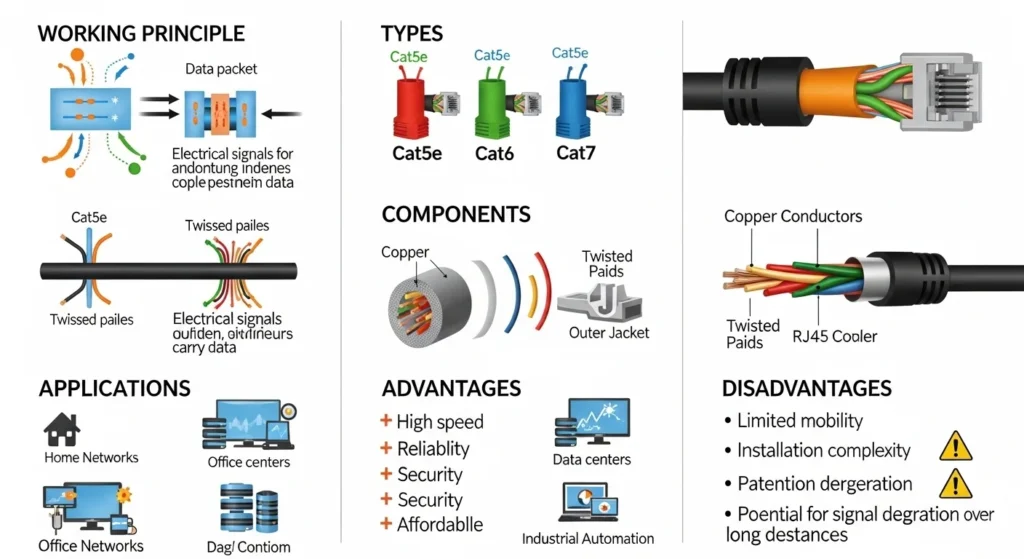
The Ethernet cable working principle is based on transmitting digital data signals through twisted copper wires inside the cable.
These wires carry electrical signals that represent digital information such as files, videos, and webpages.
Step-by-Step Working Process
- Data Creation
A device such as a computer creates digital data when a user opens a website or sends a file.
- Signal Conversion
The network interface card (NIC) converts the digital data into electrical signals.
- Signal Transmission
These signals travel through the copper wires inside the Ethernet cable.
- Twisted Pair Design
The wires are twisted together to reduce electromagnetic interference and signal noise.
- Signal Reception
The receiving device interprets the electrical signals and converts them back into digital data.
Simple Analogy
Think of an Ethernet cable like a highway for digital data. Cars represent data packets, and the cable acts as the road that carries them safely from one device to another.
Types of Ethernet Cables
Ethernet cables are classified based on performance, speed, and bandwidth.
Cat5 Cable
Category 5 (Cat5) is an older Ethernet cable type.
Features:
- Supports speeds up to 100 Mbps
- Used in early computer networks
- Mostly replaced by newer cables
Cat5e Cable
Cat5e stands for Category 5 Enhanced.
Features:
- Supports speeds up to 1 Gbps
- Reduced interference
- Commonly used in home networks
Cat6 Cable
Cat6 cables provide higher performance than Cat5e.
Features:
- Supports speeds up to 10 Gbps (short distance)
- Improved noise reduction
- Used in modern office networks
Cat6a Cable
Cat6a stands for Category 6 Augmented.
Features:
- Supports 10 Gbps up to longer distances
- Better shielding
- Used in data centers and enterprise networks
Cat7 and Cat8 Cables
These are advanced Ethernet cables designed for very high-speed networks.
Features:
- Higher bandwidth
- Strong shielding
- Used in data centers and high-performance networking systems
Main Components of an Ethernet Cable
An Ethernet cable contains several important parts that allow it to transmit data effectively.
Copper Conductors
Ethernet cables usually contain eight copper wires arranged in four twisted pairs. These wires carry electrical data signals.
Twisted Pair Structure
The wires are twisted together to reduce electromagnetic interference and maintain signal quality.
Insulation
Each copper wire is covered with insulation to prevent electrical contact between wires.
Shielding (Optional)
Some Ethernet cables include shielding to protect signals from external interference.
Outer Jacket
The outer jacket protects the cable from physical damage, moisture, and environmental conditions.
RJ45 Connector
At both ends of the cable, RJ45 connectors are used to connect the cable to networking devices such as routers, switches, and computers.
Ethernet Cable Advantages
Understanding the Ethernet cable advantages and disadvantages helps engineers choose the right networking solution.
Advantages
- Provides stable and reliable internet connection
- Faster data transfer compared to many wireless connections
- Low signal interference
- High security because data travels through a physical cable
- Supports high-speed networks
- Suitable for professional and industrial networks
Ethernet cables are widely used because of their reliability and performance.
Ethernet Cable Disadvantages / Limitations
Although Ethernet cables are very useful, they also have some limitations.
Disadvantages
- Limited cable length (usually 100 meters for standard cables)
- Requires physical installation
- Less flexible compared to wireless networks
- Cable management can be difficult in large installations
- Installation cost may increase in large buildings
Despite these limitations, Ethernet cables remain one of the most reliable networking technologies.
Ethernet Cable Applications
There are many important Ethernet cable applications in modern communication systems.
Home Networking
Ethernet cables connect computers, routers, gaming consoles, and smart TVs.
Office Networks
Businesses use Ethernet cables to connect computers, printers, and servers.
Data Centers
High-performance Ethernet cables connect servers, storage devices, and networking equipment.
Industrial Automation
Ethernet cables are used in automated factories and industrial control systems.
Security Systems
IP cameras and surveillance systems use Ethernet cables for data transmission.
Comparison: Ethernet Cable vs Fiber Optic Cable
Understanding the difference between Ethernet cable and fiber optic cable is important for networking engineers.
| Feature | Ethernet Cable | Fiber Optic Cable |
|---|---|---|
| Transmission Medium | Copper wire | Glass fiber |
| Data Signal | Electrical signal | Light signal |
| Maximum Distance | Around 100 meters | Several kilometers |
| Speed | High | Extremely high |
| Cost | Lower | Higher |
Fiber optic cables are faster, but Ethernet cables are more affordable and easier to install.
Selection Guide: Choosing the Right Ethernet Cable
Selecting the correct Ethernet cable depends on several factors.
Network Speed Requirement
If the network requires high speed, choose Cat6 or Cat6a cables.
Installation Environment
Shielded cables should be used in environments with high electrical interference.
Cable Length
Standard Ethernet cables support up to 100 meters for reliable communication.
Future Expansion
Choosing higher-category cables helps support future network upgrades.
For beginners, Cat6 cables are often the best choice for modern networks.
Common Problems & Solutions
Problem 1: Slow Network Speed
Cause:
Using outdated cables such as Cat5.
Solution:
Upgrade to Cat6 or higher category cables.
Problem 2: Cable Damage
Cause:
Physical damage due to bending or pressure.
Solution:
Replace damaged cables and use proper cable management.
Problem 3: Connection Failure
Cause:
Loose or damaged RJ45 connectors.
Solution:
Check connectors and re-crimp the cable if necessary.
Problem 4: Signal Interference
Cause:
Electromagnetic interference from electrical equipment.
Solution:
Use shielded Ethernet cables.
Future Trends in Ethernet Technology
Networking technology continues to evolve with higher speeds and improved reliability.
High-Speed Ethernet
Modern networks are adopting 40 Gbps and 100 Gbps Ethernet technologies.
Power over Ethernet (PoE)
PoE allows Ethernet cables to deliver both data and electrical power to devices such as IP cameras and wireless access points.
Smart Building Networks
Ethernet cables are used in smart homes and smart buildings for automation systems.
Data Center Innovation
Advanced Ethernet standards are improving performance in cloud computing and large data centers.
These developments show that Ethernet technology will remain an important part of networking systems.
Conclusion
An Ethernet cable is one of the most important components in modern computer networking. It provides a reliable physical connection that allows devices to communicate and exchange data efficiently.
Understanding the Ethernet cable working principle, types, and components helps electrical students and technicians build strong networking knowledge. Ethernet cables are widely used because they offer high speed, stability, and security.
The Ethernet cable applications range from home networks and offices to industrial systems and large data centers. Although wireless technology is becoming more common, Ethernet cables still provide superior reliability in many situations.
By learning about the Ethernet cable advantages and disadvantages, beginners can make better decisions when designing or installing network systems. With future technologies such as high-speed Ethernet and Power over Ethernet, this technology will continue to play a major role in modern communication infrastructure.